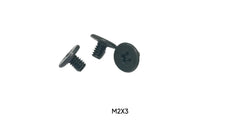
Quick answer: M.2 SSD Screw Specifications
- The standard M.2 SSD mounting screw measures M2 x 3mm—a metric screw with 2mm diameter and 3mm length.
- The M2 designation refers to the metric screw size, not the M.2 form factor name.
- Thread pitch for M2 screws measures 0.4mm, providing fine threading that engages securely with the brass or steel standoffs.
M.2 screws secure solid state drives to motherboards and adapter cards, providing both mechanical retention and proper spacing through standoffs. These specialized fasteners follow specific size standards that ensure M.2 SSDs mount correctly and maintain the precise height required for proper connector engagement.
Computer builders and technicians search for M.2 screw information when installing new SSDs, replacing lost mounting hardware, or troubleshooting drives that won't seat properly in M.2 slots. Understanding the correct screw specifications prevents drive damage and ensures reliable operation.
M.2 SSD Screw Specifications
The standard M.2 SSD mounting screw measures M2 x 3mm—a metric screw with 2mm diameter and 3mm length. This specific size works with the standardized M.2 standoffs found on motherboards and adapter cards. The M2 designation refers to the metric screw size, not the M.2 form factor name.
Thread pitch for M2 screws measures 0.4mm, providing fine threading that engages securely with the brass or steel standoffs. The 3mm length allows the screw to pass through the M.2 drive's mounting hole and engage adequate threads in the standoff without bottoming out.
Some installations use M2 x 2.5mm screws, particularly with low-profile standoffs or specific motherboard designs. The shorter length prevents the screw from protruding through the standoff, which could contact components beneath the motherboard.
M.2 Standoff Heights and Compatibility
M.2 standoffs elevate the SSD to the correct height for proper M.2 connector engagement. Standard standoff heights measure 3mm, 4mm, or 5mm depending on the motherboard design and M.2 slot type. The standoff height determines the required screw length.
Single-sided M.2 drives (components on one side only) typically use 3mm standoffs with M2 x 3mm screws. Double-sided drives (components on both sides) may require taller standoffs to provide clearance for components on the drive's underside.
Adjustable standoffs allow height modification to accommodate different drive thicknesses. These standoffs feature multiple threading positions or stackable design, with the mounting screw length remaining constant at 3mm.
Head Styles for M.2 Mounting
Pan head M2 screws are most common for M.2 SSD mounting, providing a low profile that doesn't interfere with adjacent components or cooling solutions. The wide head distributes clamping force across the drive's mounting hole without damaging the circuit board.
Countersunk screws appear occasionally in M.2 installations where flush mounting is desired. These screws require countersunk holes in the M.2 drive, which is uncommon as most drives feature standard through-holes.
Phillips drive recesses dominate M.2 mounting screws due to tool availability. Some premium motherboards include hex socket screws for improved torque control and reduced cam-out risk during installation.
Identifying M.2 Screw Size
Visual inspection can distinguish M2 screws from larger M2.5 or M3 screws when comparing side by side, but the small size difference makes measurement preferable. Use digital calipers to measure thread diameter—M2 screws measure 2.0mm.
Length verification requires measuring from the underside of the screw head to the tip. Standard M.2 mounting screws measure 3mm in length. Screws measuring 2.5mm or 4mm may work in specific installations but aren't universal.
Thread pitch confirmation uses a thread pitch gauge or manual counting. M2 screws with 0.4mm pitch have exactly 2.5 threads per millimeter of length.
Proper M.2 SSD Installation Technique
Insert the M.2 drive into the slot at a 30-degree angle, ensuring the connector fully engages. The drive should slide smoothly into the slot without forcing. Resistance indicates misalignment or incorrect drive type for the slot.
Press the drive down gently until the mounting hole aligns with the standoff. The drive should lie flat against the standoff without gaps. If the drive doesn't reach the standoff, verify you're using the correct mounting position for the drive's length (2230, 2242, 2260, 2280, or 22110).
Start the mounting screw by hand, turning counter-clockwise until feeling the thread drop into the standoff, then proceed clockwise. This technique prevents cross-threading the standoff, which can permanently damage the motherboard.
Tighten the screw until the drive sits firmly against the standoff, then add only a slight additional turn. Over-tightening can warp the M.2 drive's circuit board, potentially damaging components or traces. The screw requires minimal torque—approximately 0.2 Nm.
Common M.2 Installation Problems
Drives that won't lie flat against the standoff indicate incorrect standoff height or position. Verify the standoff is installed in the correct location for your drive's length. M.2 slots typically have multiple standoff positions marked 2230, 2242, 2260, 2280, and 22110.
Screws that won't thread into the standoff suggest cross-threading or incorrect screw size. Back the screw out completely and restart threading. If the screw still won't engage, verify you're using an M2 screw, not M2.5 or M3.
Missing mounting screws are common, as the tiny M2 screws are easily lost during motherboard installation or system maintenance. Many motherboards ship with spare M.2 screws attached to the motherboard box or included in accessory bags.
Standoff Installation and Adjustment
M.2 standoffs thread into the motherboard using coarser threads than the mounting screw. Hand-tighten standoffs until snug, avoiding excessive force that could strip the motherboard's threaded insert.
Adjustable standoffs require setting the correct height before installing the drive. Consult the motherboard manual to determine the appropriate height for your M.2 drive type. Single-sided drives typically use the lowest setting, while double-sided drives need additional clearance.
Some motherboards use press-fit or snap-in standoffs rather than threaded types. These standoffs install by pressing firmly into the motherboard until they click into place. Removal requires carefully prying the standoff from its mounting hole.
Alternative M.2 Mounting Solutions
Tool-free M.2 mounting systems use spring-loaded latches or clips instead of screws. These systems allow rapid drive installation and removal without tools, beneficial for systems requiring frequent drive changes. The latches provide adequate retention force for most applications.
Thermal pad mounting combines the mounting screw with a thermal interface material that contacts the drive's controller chip. This approach improves heat dissipation while maintaining proper mechanical retention.
M.2 heatsinks often include their own mounting systems with longer screws that pass through both the heatsink and drive. These screws may measure 4mm to 6mm in length to accommodate the heatsink thickness.
Replacement Screw Sourcing
Aftermarket M2 x 3mm screws function identically to original equipment when specifications match. The critical parameters are M2 diameter, 0.4mm thread pitch, and 3mm length. Head style and finish may vary without affecting function.
M.2 screw kits often include multiple screws and standoffs in various heights, providing complete mounting solutions for different M.2 configurations. These kits offer convenient replacements for lost hardware.
Computer hardware retailers and motherboard manufacturers sell M.2 mounting hardware separately. When ordering, specify M2 x 3mm screws to ensure compatibility with standard M.2 standoffs.
Preventing Screw Loss
Store removed M.2 screws in labeled containers or magnetic parts trays during system maintenance. The tiny size makes these screws easy to lose on work surfaces or drop into computer cases.
Some technicians attach removed M.2 screws to the drive itself using a small piece of tape, keeping the screw with the component it secures. This approach prevents mixing screws from different mounting points.
Magnetic screwdrivers help retain M2 screws during installation, though the magnetism should be weak enough to avoid affecting the SSD's components. Most modern SSDs are unaffected by weak magnetic fields.
Conclusion
M.2 SSD mounting requires M2 x 3mm screws that work with standardized standoffs to provide proper drive height and retention. Understanding correct screw specifications, proper installation techniques, and standoff compatibility ensures reliable SSD mounting. Using appropriate torque and verifying standoff position prevents drive damage while maintaining the precise alignment necessary for proper M.2 connector engagement.
Get the complete kit: new NVMe drives rarely include the mounting screw, and boards differ in which length they need. The M.2 SSD Install Kit has 4× M2 x 3mm and 4× M2 x 4mm screws, so you have the right length for a standard standoff or a taller, heatsink-equipped slot, plus spares for the next build.