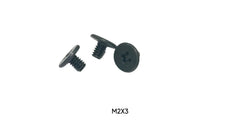
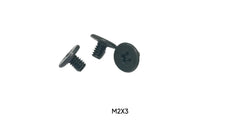
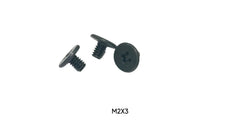
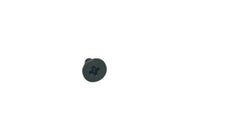
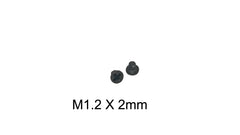
M.2 screw size: M2 x 0.4 x 3mm
The screw that holds an M.2 / NVMe SSD is a metric M2 screw, usually 3mm long, that threads into a small hex standoff on the motherboard.
- Thread diameter: 2.0mm (that is what "M2" means)[1]
- Thread pitch: 0.4mm, the ISO coarse pitch for M2[1]
- Length: 3mm on most desktop boards; 2mm to 4mm across laptops and boards with taller standoffs[2]
- Head: low, wide flat or pan head about 4mm across, Phillips #0/#1 (some laptops use Torx T5)[2][3]
- Standoff: a hex post with an M2 internal thread, fitted in the hole that matches the drive length (2242, 2260 or 2280)
Lost it? M2 x 3mm NVMe screws, 100-pack ($7.99) · M.2 install kit, 3mm + 4mm ($6.99) · standoff + screw kit ($7.99). Size chart by device ↓
Building or upgrading a PC is an exciting process, but it can come to a screeching halt over the tiniest of components: the M.2 SSD screw. If you're wondering what size screw you need or where to find a replacement for a lost one, you've come to the right place. The most common size for M.2 SSD screws is M2 x 3mm, which refers to an M2 diameter screw with a 3mm length. These small but mighty fasteners are essential for securing your high-speed storage to the motherboard, ensuring a stable and reliable connection for years to come.
M.2 Screw Dimensions
These are the dimensions of the standard M.2 SSD retention screw. Note that "M.2" is the name of the drive slot and "M2" is the metric screw size; the slot happens to use an M2 screw.
| Dimension | M.2 SSD screw | Notes |
|---|---|---|
| Thread (nominal diameter) | M2 = 2.0mm | Metric ISO thread[1] |
| Thread pitch | 0.4mm (coarse) | Written M2-0.4 or M2 x 0.4. M2.5 is 0.45mm and M3 is 0.5mm, so they will not thread into an M2 standoff[1] |
| Length | 3mm (most common) | Measured from under the head. 2mm, 2.5mm and 4mm also appear; see the chart below[2] |
| Head diameter | about 4mm | Low pan or flat head; Sunbeam gives 3.7–4.0mm (DIN 7985), Intel lists 4mm[2][3] |
| Drive | Phillips #0 or #1 | Some laptops use Torx T5 (Framework Laptop 13)[5] |
| Standoff | Hex post, M2 internal thread | Moves to the 42, 60 or 80 hole to match a 2242, 2260 or 2280 drive; some boards use a threaded insert in the PCB instead[2] |
M.2 Screw Size Chart by Device
Manufacturer and teardown sources for specific machines. When yours is not listed, the service manual's screw list is the authoritative answer; otherwise measure the old screw or the standoff thread.
| Device / board | M.2 SSD screw | Source |
|---|---|---|
| Most desktop motherboards | M2 x 3mm into a pre-fitted standoff | Sunbeam[2] |
| Dell XPS 13 9310 | M2x3 (1 screw, SSD shield to system board) | Dell service manual[4] |
| Framework Laptop 13 | One 3.0mm-long Torx T5 screw | iFixit / Framework[5] |
| Steam Deck (LCD), 2230 SSD | One 3.4mm Phillips screw | iFixit[6] |
| Intel M.2 SSDs (generic guidance) | Intel lists M3, 3mm total, 4mm head, and says to confirm with the board maker | Intel[3] |
| ASUS boards with Q-Latch | No screw: a tool-free plastic latch holds the drive | SlashGear[7] |
If an M2 screw spins loosely in the standoff, the hole may be M2.5 or M3; compare with the M2 vs M2.5 vs M3 guide. For 2.5" SSDs and hard drives see the hard drive & SSD screw size guide.
Shop the M.2 SSD screws in this guide
 M2 x 3mm NVMe / M.2 SSD Screws, 100-Pack$7.99 · View & buy →
 M2 x 3mm M.2 SSD Screws, 50-Pack$9.99 · View & buy →
 M.2 SSD Install Kit (4x M2 x 3mm + 4x M2 x 4mm)$6.99 · View & buy →
 M.2 Standoff + Screw Kit, 10 Sets (Black)$7.99 · View & buy →
 M2 x 4mm Flat Head Screws, 10-Pack$4.99 · View & buy →
Not sure which length? Start with M2 x 3mm; the kit adds M2 x 4mm for taller standoffs. See all M.2 SSD screws & standoffs or use the screw size finder.
What Exactly Are M.2 SSD Screws?
An M.2 SSD screw is a tiny fastener used to hold a gumstick-sized M.2 solid-state drive (SSD) in place on a computer's motherboard. Unlike traditional 2.5-inch SSDs that use larger screws and fit into drive bays, M.2 drives plug directly into a dedicated slot on the motherboard and are secured at the opposite end by a single screw.
This system typically involves two components:
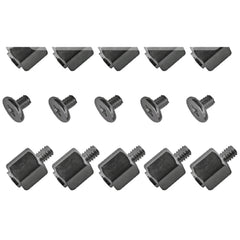
- The Standoff: This is a small hexagonal post that screws directly into the motherboard. It has a threaded hole on top and serves to raise the M.2 SSD to the correct height, preventing it from touching other motherboard components and ensuring it sits parallel to the board.
- The Screw: This is the piece that threads into the top of the standoff, clamping the end of the M.2 drive down and securing it firmly in place.
Without this screw, your M.2 drive would be held in only by the slot connector, risking a loose connection, data corruption, or physical damage from rattling around inside your case.
The Big Question: What Size Are M.2 SSD Screws?
This is the number one question builders have, and for good reason. Using the wrong size can lead to a drive that isn't secure or, worse, damage to the drive or motherboard. While there is a common standard, some variations exist.
The M.2 Screw Size Standard (and Its Exceptions)
The overwhelming standard for M.2 screws is M2. The "M" stands for metric, and the "2" indicates a 2-millimeter nominal outer diameter. The length can vary, but it is most commonly 2mm, 3mm, or 4mm.
While M2 is the standard, some motherboards or laptops might use a slightly larger M2.5 or M3 screw, and Intel's generic SSD guidance lists M3[3]. If an M2 screw spins without biting, you may have one of these exceptions; check your motherboard or laptop manual before forcing anything.
Understanding Screw Dimensions
When you see a screw listed as "M2 x 4mm," it's a simple code to read:
- M2: The metric thread size: 2.0mm nominal diameter with a 0.4mm coarse pitch[1]. A full callout is M2-0.4 x 4.
- 4mm: The length, measured from under the head to the tip for pan and wafer heads[2].
The length needed depends on the height of your standoff and the thickness of your M.2 SSD's end notch. A screw that is too short won't engage the standoff threads, while one that is too long might bottom out before securing the drive.
Common M.2 Screw Lengths Compared
All of these are M2 x 0.4 thread; only the length changes. Prices are current store prices.
| Size | Where you'll see it | Replacement |
|---|---|---|
| M2 x 2mm | Laptops and low-profile standoffs | M2 x 2mm, 100-pack ($7.99) |
| M2 x 2.5mm | Many laptop SSD and Wi-Fi card brackets | M2 x 2.5mm, 100-pack ($7.99) |
| M2 x 3mm | Most desktop motherboards; the default M.2 screw | M2 x 3mm NVMe, 100-pack ($7.99), 50-pack ($9.99) |
| M2 x 4mm | Taller standoffs, thicker drive notches | M2 x 4mm, 10-pack ($4.99), 50-pack ($4.49) |
| M2 x 5mm | Slots with a heatsink or shield clamped over the drive | M2 x 5mm, 100-pack ($7.99) |
| Standoff + screw | Board shipped without its M.2 standoff | 10 standoff sets ($7.99), 3mm + 4mm kit ($6.99) |
| M3 x 6mm | NOT for M.2 slots: 2.5" SSDs and HDDs use M3 | Shown for comparison; M3 will not thread into an M2 standoff |
How to Install an M.2 SSD: A Step-by-Step Guide
Installing an M.2 drive is one of the easiest parts of a PC build, as long as you have the right parts. Here’s how to do it correctly.
- Consult Your Manual: Before you begin, check your motherboard manual to locate the M.2 slots and identify which standoff position to use. M.2 drives come in different lengths (2242, 2260, 2280, 22110), and you must move the standoff to the hole that corresponds to your drive's length (most consumer drives are 2280).
- Install the Standoff: If it’s not already installed, screw the brass or silver standoff into the correct hole on the motherboard. You can usually do this by hand, but a small nut driver or pliers can help snug it up. Don't overtighten!
- Insert the M.2 SSD: Hold the M.2 drive by its edges. Insert the connector end into the M.2 slot at a 30-degree angle. It should slide in smoothly.
- Press the Drive Down: Gently press the end of the M.2 drive down so it sits flat and the semi-circular notch at the end lines up with the hole in the standoff.
- Secure with the Screw: Using a small Phillips #0 or #1 screwdriver, carefully thread your M.2 screw into the standoff. Tighten it until it's just snug. Do not overtighten! You only need enough pressure to hold the drive securely in place.
Help! I Lost My M.2 SSD Screw. What Now?
It’s a tale as old as time. You unbox your motherboard, set it aside, and when it’s time to install your NVMe drive, the tiny baggie with the standoff and screw is nowhere to be found. Don't panic! You have a few options.
First, double and triple-check the motherboard box. These screws are often pre-installed on the motherboard itself or tucked away in an anti-static bag labeled "M.2."
If it's truly gone, your best bet is to source a proper replacement. While some forums might suggest using tape or non-conductive shims, these are temporary, risky solutions that can fail over time due to heat cycles inside the case. A secure mechanical connection is always best.
Expert Tip: Never install an M.2 SSD without a screw. The connection can easily come loose during transport or even from vibrations, leading to sudden system shutdowns and potential data loss. It’s not worth the risk.
Where to Buy Replacement M.2 SSD Screws
When you need a replacement, you need the right part, and you need it fast. At Tech Spare Warehouse, we specialize in having the exact fasteners and components that builders and technicians need. You don't have to buy a massive, expensive kit with 100 screws you'll never use.
Here are our top recommendations for getting your build back on track:
- For Most SSD Installations: The single most common replacement you'll need is an M2 x 3mm screw. Get the M2 x 3mm NVMe screw 100-pack ($7.99), a 50-pack ($9.99), or the M.2 SSD install kit (4x M2 x 3mm + 4x M2 x 4mm, $6.99) if your standoff needs the longer screw. Missing the standoff too? Get the M.2 standoff + screw kit ($7.99).
- For General Electronics and PC Building: If you do a lot of projects, having a versatile set on hand is invaluable. Our M2 x 4mm Phillips Flat Head Machine Screws (50-pack) ($12.99) are perfect for M.2 drives and many other small electronics repairs.
Common Mistakes to Avoid During M.2 Installation
Avoid these common pitfalls to ensure a smooth and successful installation:
- Forgetting the Standoff: Screwing the M.2 drive directly to the motherboard will bend and damage the drive. Always use the standoff.
- Over-tightening the Screw: This is a major one. Cranking down on the screw can crack the SSD's printed circuit board (PCB) or strip the standoff's threads. Tighten until just snug.
- Using the Wrong Standoff Position: This puts physical stress on the drive and the M.2 slot. Make sure the standoff is in the hole that matches your drive's length (e.g., the "80" position for a 2280 drive).
- Losing the Screw Inside the Case: These screws are tiny! A magnetic-tipped screwdriver can be a lifesaver. If you drop it, make sure you find it before powering on your PC to prevent short circuits.
- Forcing the Drive In: The M.2 drive should slide into the slot with minimal force. If it doesn't fit, check that you have the keying aligned correctly and are inserting it at a slight angle.
Your Build Deserves the Right Parts
That tiny piece of metal is the only thing holding your super-fast, expensive M.2 SSD in place. Using the correct M.2 SSD screws isn't just a recommendation; it's a requirement for a stable, long-lasting PC build. From ensuring a solid data connection to preventing physical damage, taking a moment to use the right fastener saves a world of trouble down the road. Whether you're building a new gaming rig or just upgrading your storage, don't let a lost screw derail your progress. For all your hard-to-find fasteners and spare parts, be sure to check out the full catalog at Tech Spare Warehouse.
Frequently Asked Questions
What size screw is used for an M.2 SSD?
An M2 x 3mm screw: metric M2 thread (2mm diameter, 0.4mm pitch), 3mm long, threaded into a standoff on the motherboard. Some laptops and boards use 2mm, 2.5mm or 4mm lengths of the same M2 thread.
What are the dimensions of an M.2 screw?
Thread diameter 2.0mm, thread pitch 0.4mm, length usually 3mm (2 to 4mm on some boards and laptops), and a low head about 4mm across with a Phillips #0/#1 or Torx T5 drive.
Is an M.2 screw the same as an M2 screw?
M.2 is the name of the SSD slot and card format; M2 is the metric screw size. The standard M.2 SSD screw is an M2 screw, usually M2 x 3mm.
Are all M.2 screws the same?
Most are M2 x 0.4 thread, but the length varies (2mm, 2.5mm, 3mm and 4mm are common) and a few boards use M2.5 or M3. Check your motherboard or laptop manual's screw list, or match the old screw.
What is an M.2 standoff?
A small hex post that screws into the motherboard at the hole matching your drive length (2242, 2260 or 2280). It holds the SSD level with the slot, and the M.2 screw threads into its M2 internal thread.
Can you install an M.2 SSD without the screw?
You should not. Without the screw the drive is held only by the slot connector and can lift or work loose, causing disconnects. Use the screw, or a tool-free latch if your board has one.
What screwdriver do I need for an M.2 screw?
Usually a Phillips #0 or #1. Some laptops, such as the Framework Laptop 13, use Torx T5. A magnetic tip helps keep the tiny screw from dropping into the case.
I lost my M.2 screw, where can I get another?
Tech Spare Warehouse sells M2 x 3mm NVMe screws, an M.2 install kit with 3mm and 4mm screws, and standoff + screw kits for boards missing the standoff.
Sources
- ISO metric screw thread (ISO 261/262 coarse pitches)
- Sunbeam: M.2 screw guide, sizes and types
- Intel: torque value and screw size for Intel M.2 and 2.5" SSDs
- Dell XPS 13 9310 Service Manual: screw list
- iFixit / Framework: Framework Laptop 13 storage installation
- iFixit: Steam Deck SSD replacement
- SlashGear: ASUS replaces M.2 screws with Q-Latch (Feb 2021)