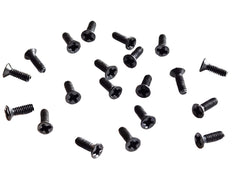
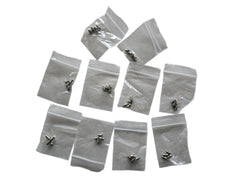
Quick answer: PC Screw Types Comparison Table
| Screw Type | Common Size / Thread |
|---|---|
| Motherboard Standoffs | #6-32 UNC (internal thread) |
| Motherboard Screws | #6-32 UNC |
| HDD / Case Screws | #6-32 UNC |
| SSD / Drive Screws | M3 |
| Fan Screws | Self-Tapping |
| Thumbscrews | #6-32 UNC or M3 |
There’s no feeling quite like the rhythm of a new PC build, until you drop a tiny, essential screw into a carpeted abyss. Suddenly, your project grinds to a halt. This is where a good PC case screw kit becomes the most valuable tool on your workbench. A PC case screw kit is a curated collection of standardized screws, standoffs, and fasteners designed for assembling, upgrading, or repairing a desktop computer. Having one on hand not only prevents frantic searching but ensures every component, from the motherboard to the storage drives, is securely and correctly installed, safeguarding your investment.
What is a PC Case Screw Kit, Really?
Think of a PC case screw kit as your build’s insurance policy. While your new chassis or motherboard will come with its own set of screws, they often provide the bare minimum. What happens when one rolls under the desk, a thread strips, or you decide to add more components later? A dedicated screw kit saves the day.
These kits gather all the essential fasteners into one organized, often compartmentalized, case. It’s the difference between a chaotic pile of mystery screws and a professional, streamlined assembly process. More than just "case" screws, a comprehensive kit includes fasteners for nearly every part of your build, making it an indispensable resource for both first-time builders and seasoned technicians.
Why You Absolutely Need a Standardized Screw Kit
Investing in a proper set of computer screws is one of the smartest, most cost-effective decisions you can make in your PC building journey. Here’s why it’s a non-negotiable part of any builder’s toolkit:
- Saves Time and Frustration: Stop guessing and searching. The right screw is always at your fingertips, turning a potential 30-minute scavenger hunt into a 30-second fix.
- Ensures Proper Component Installation: A secure fit is crucial. The correct screw prevents wobbly motherboards, sagging graphics cards, and vibrating hard drives, which can lead to performance issues or damage.
- Prevents Costly Damage: Using a screw that’s too long or has the wrong thread can be catastrophic. You could crack your motherboard, puncture a drive’s electronics, or strip the threading in your case. A kit eliminates this risk.
- Supports Future Upgrades: When you decide to add a new SSD, more case fans, or a different component, you’ll have the exact hardware you need ready to go.
- Simplifies Maintenance and Repairs: From a simple cleaning to a full component swap, having spare screws makes maintaining your rig painless. This is especially true for laptop users, where specific fasteners like these M2 x 5mm screws for Dell Inspiron cases can be hard to find otherwise.
Decoding Your PC Screw Kit: A Visual Guide
Opening a screw kit for the first time can be intimidating. So many tiny pieces! However, the vast majority of PC building relies on just a few key types. Let's break them down.
Motherboard Standoffs
These are arguably the most critical components in the entire kit. Standoffs are typically brass-colored, hexagonal spacers that you screw into the case before installing the motherboard. Their job is to create a gap between the motherboard’s printed circuit board (PCB) and the metal case, preventing electrical shorts that could instantly destroy your components.
#6-32 UNC Screws (Motherboard and Case Screws)
These are the workhorses of PC building. They have a coarser thread than M3 screws and are generally used for two main purposes:
- Securing the Motherboard: After installing the standoffs, you’ll use these screws to fasten the motherboard to them. They usually have a Phillips head and a wider top surface.
- Securing 3.5-inch HDDs & Case Components: These same screws are often used to mount larger 3.5-inch hard drives and to secure expansion cards (like GPUs) to the rear of the case.
M3 Screws (SSD and Optical Drive Screws)
M3 screws are metric and have a finer thread than #6-32 screws. They are the standard for mounting smaller components that require a more delicate touch. If a #6-32 screw doesn't seem to fit, don't force it—you probably need an M3. You'll use them for securing 2.5-inch SSDs, M.2 drives, and older 5.25-inch optical drives. Having high-quality, dedicated M2 screws for SSD mounting can ensure a perfect fit without risking stripped heads.
Case Fan Screws
These are easy to spot. They are typically longer, thicker, and feature a very coarse, self-tapping thread. This design allows them to securely bite into the soft plastic of a case fan’s frame, holding it firmly against the chassis to minimize vibration and noise.
PC Screw Types Comparison Table
Here a quick reference table to help you identify the right screw for the job:
| Screw Type | Common Size / Thread | Primary Use Cases |
|---|---|---|
| Motherboard Standoffs | #6-32 UNC (internal thread) | Lifting motherboard off the case to prevent short circuits. |
| Motherboard Screws | #6-32 UNC | Securing motherboard to standoffs. |
| HDD / Case Screws | #6-32 UNC | Mounting 3.5" hard drives, securing expansion cards. |
| SSD / Drive Screws | M3 | Mounting 2.5" SSDs, M.2 drives, 5.25" optical drives. |
| Fan Screws | Self-Tapping | Attaching case fans to the chassis. |
| Thumbscrews | #6-32 UNC or M3 | Securing case side panels for tool-less access. |
Common PC Building Screw Mistakes (and How to Avoid Them)
Using the wrong screw can lead to stripped threads at best and dead components at worst. Here are the most common mistakes builders make:
- Forgetting Standoffs: We have to say it again. This is the #1 most catastrophic error a new builder can make. Always install standoffs before your motherboard.
- Mixing #6-32 and M3 Screws: Forcing a coarse #6-32 screw into a fine M3 hole (like on an SSD) will destroy the threading. If a screw resists, stop and check if you have the right type.
- Over-tightening: Screws should be "finger-tight" plus a small quarter-turn with a screwdriver. Over-tightening can crack a motherboard’s PCB or strip the screw head, making it impossible to remove.
- Losing the M.2 Screw: The M.2 screw is notoriously tiny and easy to lose. Some motherboards come with a spare, but many don’t. It’s wise to have a backup, as a floating M.2 drive is a recipe for disaster. Kits with a variety of small screws, like this collection of M2 Phillips flat head screws, are invaluable here.
What to Look For When Buying a PC Case Screw Kit
Not all kits are created equal. When choosing the right PC case screw kit, consider these factors:
1. Quantity and Variety: A good general-purpose kit should contain a healthy supply of the main screw types: #6-32 UNC, M3, motherboard standoffs, and fan screws. If you work on specific systems, consider a specialized kit. For example, Mac repair technicians would benefit immensely from a dedicated set like these hard drive screws for MacBook Pro.
2. Quality and Material: Low-quality screws made from soft metal can strip easily, turning a simple task into a nightmare. Look for kits with fasteners made from durable materials like carbon steel. This ensures they can withstand repeated use without deforming.
3. Organization: The best kits come in a plastic organizer with separate compartments for each screw type. This is crucial for quickly identifying and accessing the fastener you need, keeping your workspace tidy and efficient.
4. Specialty Fasteners: Do you need thumbscrews for easy access? Rubber grommets for silencing hard drives? Or specific screws for niche builds like a home theater PC or a custom keyboard? Some kits include these extras, while for other projects you might need a very specific part, like M3.5 screws for JL Audio amplifiers.
Conclusion: Build with Confidence
In the grand scheme of a PC build costing hundreds or thousands of dollars, a high-quality PC case screw kit is a trivial expense. Yet, its value is immeasurable. It’s the difference between a smooth, enjoyable building experience and a frustrating, problem-plagued one. It empowers you to perform upgrades, conduct maintenance, and even tackle repairs with the confidence that you have the right part for the job every single time. Don’t let a tiny piece of metal be the weak link in your masterpiece.
For all your computer and electronic spare part needs, from individual screws to comprehensive kits, trust the experts and browse our full catalog at Tech Spare Warehouse.
Frequently Asked Questions
What is the most common PC screw?
The #6-32 UNC screw is the most common and versatile screw in PC building. It's used for securing motherboards to standoffs, fastening 3.5-inch hard drives, and locking in expansion cards to the case.
Are all motherboard screws the same?
While the vast majority of motherboards use #6-32 UNC screws for mounting, the screw head style can vary (e.g., Phillips hex head vs. pan head). However, the thread size is standardized across the industry.
Can I build a PC without motherboard standoffs?
Absolutely not. Installing a motherboard directly onto the metal case tray will cause a catastrophic electrical short, which will likely destroy the motherboard and could damage other connected components. Standoffs are mandatory.
What's the difference between M3 and #6-32 screws?
The main difference is the threading. #6-32 UNC is an imperial thread standard that is coarser, while M3 is a metric standard with a finer thread. #6-32 is for motherboards and HDDs; M3 is for smaller drives like SSDs and optical drives.
Where can I buy just one specific type of screw, like an M.2 screw?
You can often find specific computer screw types at specialty electronics suppliers. Here at Tech Spare Warehouse, we offer everything from full kits to specific fasteners like individual M2 screws suitable for SSD and M.2 drive mounting.
Do PC cases come with all the screws I need?
Most new PC cases include a basic set of screws sufficient for an initial build. However, they rarely include extras, and a dedicated PC case screw kit is highly recommended for spares, future upgrades, or in case any of the included screws are lost or damaged.
Is it safe to use a magnetic screwdriver for PC building?
Yes, it is generally safe. The magnetism from a typical magnetic-tip screwdriver is far too weak to cause any damage to modern, well-shielded PC components like CPUs, RAM, or SSDs. In fact, it can be very helpful for positioning screws in tight spaces.