Quick answer: M.2 Standoff vs. M.2 Screw: What's the Difference?
| Feature | M.2 Standoff | M.2 Screw |
|---|---|---|
| Purpose | Sets the correct height and provides the mounting point. | Secures the M.2 drive to the top of the standoff. |
| Location | Screws directly into the motherboard itself. | Screws into the top of the M.2 standoff. |
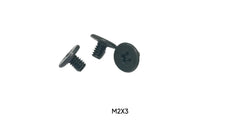
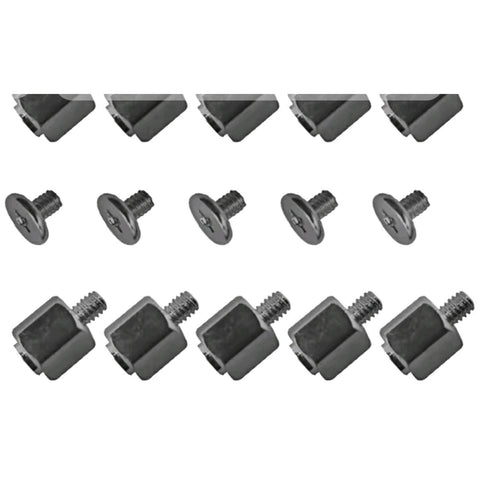
| Appearance | A hexagonal or round post with male threads on one end and female threads on the other. | A very small screw, typically with a Phillips head. |
| Analogy | The foundation pillar. | The locking bolt. |
An M.2 standoff is a small but essential component used to secure an M.2 solid-state drive (SSD) to a computer's motherboard. It's a threaded post, typically made of metal, that screws directly into the motherboard to create a raised, secure mounting point. Its primary job is to hold the M.2 drive parallel to the motherboard, ensuring a proper connection while preventing it from bending or making contact with other components, which could cause a dangerous short circuit. Without the correct M.2 standoff, your high-speed SSD could be damaged or fail to work entirely.
What Exactly Is an M.2 Standoff and Why Is It So Important?
Think of an M.2 standoff as a tiny pillar for your SSD. When you plug an M.2 drive into its slot on the motherboard, it rests at a slight upward angle. The standoff is positioned at the other end of the drive, providing a platform to screw it down flat and secure. This simple mechanism is critical for three main reasons:
- Electrical Safety: It prevents the delicate electrical contacts on the bottom of your M.2 SSD from touching the motherboard's surface or other conductive traces. Direct contact could lead to a short circuit, permanently damaging the SSD, the motherboard, or both.
- Physical Stability: It secures the drive, preventing it from vibrating or coming loose, which is especially important in systems that might be moved. A loose drive can lead to data corruption or a total loss of connection.
- Structural Integrity: By keeping the SSD perfectly parallel to the motherboard, the standoff prevents physical stress on the M.2 connector and the drive itself. Bending the drive to screw it directly into the motherboard (without a standoff) can crack the PCB or damage the connector over time.
In short, this tiny component is the lynchpin of a successful and safe M.2 installation. Forgetting it is one of the most common PC building mistakes.
The Different Types and Sizes of M.2 Standoffs
While most M.2 standoffs serve the same function, they aren't all identical. The primary variation comes down to matching the length of your M.2 SSD. Motherboards that support M.2 drives have several small, labeled screw holes to accommodate different drive sizes.
Understanding M.2 Form Factors
M.2 drives are identified by a number that denotes their physical dimensions. The most common sizes are:
- 2280: 22mm wide x 80mm long (This is the most common size for consumer NVMe and SATA M.2 SSDs)
- 2260: 22mm wide x 60mm long
- 2242: 22mm wide x 42mm long
- 2230: 22mm wide x 30mm long (Often used in handhelds and compact laptops)
Your motherboard will have screw holes marked "2280," "2260," and "2242." You simply screw the M.2 standoff into the hole that corresponds to the length of your drive.
How to Install an M.2 Standoff and SSD: A Step-by-Step Guide
Installing an M.2 drive is one of the easiest parts of a PC build, as long as you have the right parts and follow the steps carefully. Here’s how to do it right:
- Consult Your Manual: Before you begin, read your motherboard's manual. It will show you the exact location of the M.2 slots and which screw holes correspond to which drive sizes.
- Locate the M.2 Slot and Standoff: Find the M.2 slot on your motherboard. The necessary standoff and screw are often found in a tiny plastic bag included with your motherboard accessories. Some modern motherboards have pre-installed or tool-less mechanisms, so check for those first.
- Install the Standoff: Determine the length of your M.2 drive (e.g., "2280"). Screw the brass or silver M.2 standoff into the corresponding hole on the motherboard. It should be finger-tight, with a gentle final snug-up using a small nut driver or pliers if needed—but be gentle!
- Insert the M.2 SSD: Hold the M.2 drive by its edges and gently slide the gold-contact end into the M.2 slot at an approximately 20-30 degree angle. It should slide in without much force.
- Secure the Drive: Gently press the end of the M.2 drive down so that the semi-circular notch at its end aligns with the threaded hole in the standoff you just installed.
- Fasten the M.2 Screw: Use a small Phillips-head screwdriver to fasten the M.2 screw into the top of the standoff. The screw should be just snug enough to hold the drive firmly in place. Do not overtighten! Overtightening can damage the drive, the standoff, or the motherboard.
Common M.2 Installation Mistakes to Avoid
Even a simple process has pitfalls. Here are some common errors to watch out for:
- Forgetting the Standoff: The most frequent mistake. Screwing the drive directly to the motherboard will bend it, risking damage.
- Using the Wrong Standoff Hole: Using the 2260 hole for a 2280 drive will leave the end unsupported, and you won't be able to secure it. Always match the hole to your drive length.
- Overtightening the Screw: This can strip the threads on the standoff or screw, crack the SSD's PCB, or make future removal difficult. Just snug is enough.
- Losing the Screw: The M.2 screw is famously tiny and easy to lose. Work in a well-lit area and keep a magnetic parts tray handy.
- Forcing the Drive: The M.2 drive should slide into the slot smoothly. If it doesn't, check the orientation and keying (the notch in the contacts). There are B-key, M-key, and B+M-key drives that fit in specific slots.
M.2 Standoff vs. M.2 Screw: What's the Difference?
It’s easy to confuse the two, but they serve distinct purposes. One sets the stage, and the other locks it down. Here’s a simple breakdown:
| Feature | M.2 Standoff | M.2 Screw |
|---|---|---|
| Purpose | Sets the correct height and provides the mounting point. | Secures the M.2 drive to the top of the standoff. |
| Location | Screws directly into the motherboard itself. | Screws into the top of the M.2 standoff. |
| Appearance | A hexagonal or round post with male threads on one end and female threads on the other. | A very small screw, typically with a Phillips head. |
| Analogy | The foundation pillar. | The locking bolt. |
Troubleshooting: What if Your Motherboard Didn't Come with a Standoff?
You're ready to install your new, blazing-fast M.2 SSD, but you can't find the standoff or screw anywhere. Don't panic! First, double-check everything. Some motherboards come with the standoff pre-installed in the primary 2280 position. Others have tool-less plastic latches that rotate to lock the drive. Re-examine the motherboard box and the anti-static bag it came in; the parts are often in a tiny, easily missed baggie.
If it's truly gone, you cannot proceed without one. The solution is simple: you need to buy a replacement. M.2 standoff and screw kits are widely available and very affordable. They often come with multiple standoffs and screws of slightly different heights and thread pitches to ensure compatibility with various motherboards like ASUS, Gigabyte, MSI, and ASRock.
Conclusion: The Tiny Part That Protects Your Performance
The M.2 standoff might seem like an insignificant piece of metal, but it's a non-negotiable component for any PC build involving an M.2 drive. It guarantees your drive is installed safely, securely, and correctly, protecting it from physical and electrical damage that could cost you both data and money. Always take the time to install it correctly, and if you've lost yours, be sure to grab a replacement before proceeding. For all your other essential PC building components and spare parts, be sure to browse the extensive catalog at Tech Spare Warehouse.
For the installation steps, see how to install motherboard and M.2 standoffs.
Frequently Asked Questions
Do all M.2 drives need a standoff?
Yes, any M.2 drive that is installed directly onto a motherboard requires a standoff to ensure it is held parallel to the board and does not make improper contact with it. The only exception is some motherboards that use a built-in tool-less clamping mechanism instead of a screw and standoff.
What happens if I don't use an M.2 standoff?
If you don't use a standoff, you risk severe damage to your hardware. The drive will be bent, putting stress on the connector and the drive's circuit board. More critically, the electrical contacts on the bottom of the SSD could touch components on the motherboard, causing a short circuit that could destroy the drive, the motherboard, or both.
Are M.2 standoffs and screws universal?
Mostly, but not entirely. They are highly standardized. The vast majority of motherboards use an M2x3mm screw (M2 thread, 3mm length) and a standoff with a matching thread. However, very slight variations in height or thread pitch can exist between brands, so it's always best to use the hardware that came with your motherboard or a kit specifically marketed as a universal M.2 screw kit.
Can I use a plastic standoff for an M.2 drive?
It's not recommended, though some tool-less designs use plastic. Metal standoffs are preferred because they are more durable and can sometimes help, in a very minor way, with grounding or heat dissipation. A plastic standoff is better than no standoff, but a proper metal one is the correct component for the job.
My motherboard has a built-in M.2 standoff, do I need another one?
No. If your motherboard has a pre-installed standoff or a tool-less latch system for securing the drive, you should use that system as intended. Do not try to add a second standoff. Always follow the manufacturer's instructions.
How tight should the M.2 screw be?
The M.2 screw should be just snug. You should tighten it until you feel gentle resistance, and then stop. The goal is to prevent the drive from moving, not to lock it down with extreme force. Overtightening is a common mistake that can damage the screw, standoff, or SSD.
Get the complete kit: if your standoff is already in place and only the screw is missing, the M.2 SSD Install Kit covers both common lengths: 4× M2 x 3mm and 4× M2 x 4mm (the 4mm reaches taller standoffs and heatsink-equipped slots).