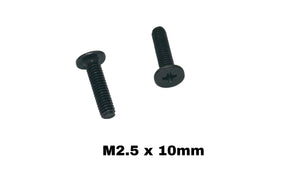
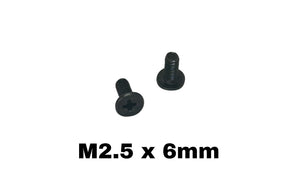
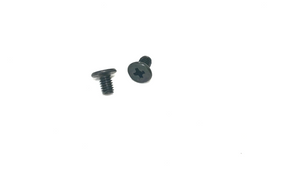
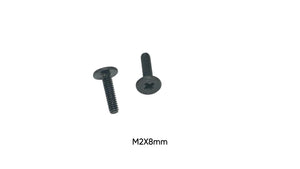
If you’ve opened a laptop for a repair or upgrade, you’ve probably noticed how small and specific the screws are. Laptop screws are not universal. The wrong diameter can strip threads, and the wrong length can crack plastic, dimple the palmrest, or—worst case—damage a battery or board.
This guide breaks down the most common laptop screw sizes, typical lengths, and where they’re usually found.
The 3 Things That Define a Laptop Screw
When someone says “I need a laptop screw,” they really mean a screw defined by:
-
Diameter (M size): M1.2, M1.4, M1.6, M2, M2.5, M3
-
Length (mm): measured from under the head to the tip
-
Head type / fit: the head shape determines how it seats (flat, pan, wafer, etc.)
(For most buyers, diameter + length gets them 95% of the way there.)
Most Common Laptop Screw Sizes (By Diameter + Typical Length Range)
M1.2 (Tiny / micro)
Typical lengths: 1.2mm–2.0mm (most common 1.5mm)
Common placements:
-
Very small internal assemblies
-
Occasionally used around delicate plastic housings or tiny brackets
What it looks like in real life: “Almost jewelry-small.”
M1.4 (Ultrathin / keyboard-area hardware)
Typical lengths: 1.6mm–3mm (most common 2mm)
Common placements:
-
Keyboard surround areas
-
Small internal retaining brackets
-
Some trackpad/IO assemblies on thin laptops
Common pattern: if you see a very short screw holding something light, M1.4 × 2mm is often the match.
M1.6 (Common internal screw for brackets + light mounts)
Typical lengths: 2mm–4mm (most common 3mm and 4mm)
Common placements:
-
Small internal brackets
-
Speaker mounts (sometimes)
-
Daughterboard covers / shields (in some designs)
-
Light “support” screws where you don’t want longer depth
Typical “go-to” sizes: M1.6 × 3mm, M1.6 × 4mm
M2 (Workhorse internal screw + SSD screw territory)
Typical lengths: 2mm–8mm (most common 2.5mm–6mm)
Common placements:
-
M.2 SSD mount (most often M2 × 3mm)
-
Wi-Fi card mount screws (often M2, short length)
-
Many internal board/bracket locations
-
Fan shroud mounts (varies)
Common “go-to” sizes: M2 × 2.5mm, M2 × 3mm, M2 × 4mm, M2 × 5mm, M2 × 6mm
M2.5 (Bottom cover + structural hardware on many laptops)
Typical lengths: 3mm–10mm (most common 4mm–8mm)
Common placements:
-
Bottom case screws (very common)
-
Some hinge/frame points (depends on model)
-
Internal structural mounts in thicker chassis
Common “go-to” sizes: M2.5 × 4mm, M2.5 × 5mm, M2.5 × 6mm, M2.5 × 8mm, M2.5 × 10mm
M3 (Heavier mounts / thicker chassis points)
Typical lengths: 3mm–8mm (most common 4mm–6mm)
Common placements:
-
Some hinge mounts
-
Heavier frame points
-
Chassis reinforcement points in thicker laptops
Common “go-to” sizes: M3 × 4mm, M3 × 5mm, M3 × 6mm
Where Screws Go in a Laptop (Most Common Sizes + Lengths by Location)
This section is the “real-world map.”
1) Bottom Case / Back Cover Screws (most common missing screws)
Most common diameters: M2.5 (often), sometimes M2 or M3
Typical lengths: 4mm–8mm
Common patterns:
-
Many laptops use multiple lengths on the bottom case (for example: front edge shorter, hinge side longer).
-
If the screw sits near a battery cavity, manufacturers often use a shorter length for safety.
Very common bottom case sizes to stock:
-
M2.5 × 4mm
-
M2.5 × 5mm
-
M2.5 × 6mm
-
M2.5 × 8mm
-
(sometimes) M2.5 × 10mm
-
(some models) M3 × 4mm / M3 × 5mm
2) Hinge Screws (high-stress area)
Most common diameters: M2.5 or M3
Typical lengths: 5mm–10mm (varies heavily)
What makes hinge screws different: they’re often longer and bite into thicker metal standoffs or reinforced plastic.
Common hinge sizes:
-
M2.5 × 6mm
-
M2.5 × 8mm
-
M2.5 × 10mm
-
M3 × 5mm
-
M3 × 6mm
3) Motherboard Mount Screws (internal frame points)
Most common diameters: M2 and M1.6 (sometimes M2.5)
Typical lengths: 3mm–6mm
Common pattern: board screws usually seat into standoffs. Too long here can hit the bottom case or flex the board.
Common motherboard mount sizes:
-
M2 × 4mm
-
M2 × 5mm
-
M2 × 6mm
-
(smaller brackets) M1.6 × 3mm, M1.6 × 4mm
4) M.2 SSD Screw (the one everyone loses)
Most common size: M2 × 3mm
Other common SSD-related sizes: M2 × 2.5mm (less common), M2 × 4mm (some designs)
Placement: the tiny screw that holds down the end of the M.2 SSD at the standoff.
5) Wi-Fi Card Screw (also commonly lost)
Common diameter: M2
Typical length: 2.5mm–4mm
Common sizes:
-
M2 × 3mm
-
M2 × 4mm
-
Sometimes M2 × 2.5mm
6) Fan Screws (varies a lot by laptop)
Common diameters: M2 or M2.5
Typical lengths: 3mm–6mm
Notes: fan screws are usually short. Too long can contact the fan housing or puncture nearby plastic channels.
Common fan sizes:
-
M2 × 4mm
-
M2 × 5mm
-
M2.5 × 4mm
-
M2.5 × 5mm
7) Keyboard / Trackpad / Palmrest Screws
Common diameters: M1.4, M1.6, M2 (depends on design)
Typical lengths: 2mm–4mm
Common sizes:
-
M1.4 × 2mm
-
M1.6 × 3mm
-
M1.6 × 4mm
-
M2 × 3mm
-
M2 × 4mm
Risk note: If you use a screw that’s even 1–2mm too long here, it can:
-
push up the keyboard/palmrest
-
dimple the top case
-
interfere with trackpad click mechanism
8) Internal Brackets / Shields / Small Mounts
Common diameters: M1.6 or M2
Typical lengths: 3mm–5mm
Common sizes:
-
M1.6 × 3mm
-
M1.6 × 4mm
-
M2 × 4mm
-
M2 × 5mm
Typical “Best-Selling” Laptop Screw Sizes (If You’re Stocking Inventory)
These are the sizes that show up constantly in real repairs:
-
M2 × 2.5mm
-
M2 × 3mm (SSD + many internal mounts)
-
M2 × 4mm
-
M2 × 5mm
-
M2 × 6mm
-
M2 × 8mm
-
M2.5 × 4mm
-
M2.5 × 5mm
-
M2.5 × 6mm
-
M2.5 × 8mm
-
M2.5 × 10mm
-
M1.6 × 3mm
-
M1.6 × 4mm
-
M1.4 × 2mm
-
M3 × 4mm
-
M3 × 5mm
-
M3 × 6mm
How to Measure Screw Length Correctly (Most People Do This Wrong)
Measure laptop screws from:
Under the head → to the tip
Do NOT include the head in the length measurement.
If you measure head-to-tip, you’ll order the wrong length.
Quick Safety Rules (Avoid Damage)
-
If you’re unsure between two lengths, choose the shorter one first.
-
Never force a screw that “feels wrong” — that’s how threads strip.
-
Keep bottom-case screws separated by position (hinge-side often differs).
-
If a screw is going near the battery area, assume it’s shorter until confirmed.
Finding the Right Replacement Screw
The fastest way to get the correct match:
-
Identify the location (bottom case / hinge / SSD / Wi-Fi / internal bracket)
-
Match the most common diameter for that location
-
Match the length in mm from under-head to tip
Replacement screws are best purchased by exact size, so you don’t have to buy a full kit and hope.