Dell Inspiron 13 7300 screw size
M1.2 / M2 · 1.5 to 5 mm long
Our records put Dell Inspiron 13 7300 on M1.2 and M2 screws in lengths from 1.5 to 5 mm.
There are 15 separate fitment records for it, including touchpad (qty 3) (M1.2), touchpad (qty 4) (M1.2) and system board (qty 3) (M2), plus 12 more in the table below.
15 of the 15 records are marked confirmed, drawn from 1 source (dl.dell.com).
For reference, M1.2 is 1.2 mm across the threads at 0.25 mm pitch. The imperial size people confuse it with: #0-80 UNF (1.52 mm) is the closest imperial screw, but it is bigger — not a substitute.
Dell Inspiron 13 7300 screw specifications
One row per fitment record. Head, drive are shown only where the source states them; pitch is the ISO coarse pitch for the thread.
| Thread | Length | Pitch | Head | Drive | Where it goes | Status |
|---|---|---|---|---|---|---|
| M1.2 | 1.5 mm | 0.25 mm | not stated | not stated | Touchpad (qty 3) | Confirmed |
| M1.2 | 1.8 mm | 0.25 mm | not stated | not stated | Touchpad (qty 4) | Confirmed |
| M2 | 2 mm | 0.4 mm | not stated | not stated | System board (qty 3) | Confirmed |
| M2 | 2.5 mm | 0.4 mm | not stated | not stated | Battery (qty 5) | Confirmed |
| M2 | 2.5 mm | 0.4 mm | not stated | not stated | Bracket (qty 1) | Confirmed |
| M2 | 2.5 mm | 0.4 mm | not stated | not stated | SSD (qty 1) | Confirmed |
| M2 | 3 mm | 0.4 mm | not stated | not stated | I/O board (qty 1) | Confirmed |
| M2 | 3 mm | 0.4 mm | not stated | not stated | DC-in (qty 1) | Confirmed |
| M2 | 3 mm | 0.4 mm | not stated | not stated | Fan (qty 2) | Confirmed |
| M2 | 3 mm | 0.4 mm | not stated | not stated | Power button (qty 2) | Confirmed |
| M2 | 3 mm | 0.4 mm | not stated | not stated | Wireless card (qty 1) | Confirmed |
| M2 | 3.5 mm | 0.4 mm | not stated | not stated | Base cover (qty 3) | Confirmed |
| M2 | 4 mm | 0.4 mm | not stated | not stated | Display (qty 6) | Confirmed |
| M2 | 4 mm | 0.4 mm | not stated | not stated | Hinge (qty 3) | Confirmed |
| M2 | 5 mm | 0.4 mm | not stated | not stated | Base cover (qty 4) | Confirmed |
Fitment records and sources
Touchpad (qty 3)
pitch 0.25 mm · tap 0.95 mm · clearance 1.4 mm · PH000 / JIS 00 / Torx T1–T2
Touchpad (qty 4)
pitch 0.25 mm · tap 0.95 mm · clearance 1.4 mm · PH000 / JIS 00 / Torx T1–T2
System board (qty 3)
pitch 0.4 mm · tap 1.6 mm · clearance 2.4 mm · PH0 / Torx T6
Battery (qty 5)
pitch 0.4 mm · tap 1.6 mm · clearance 2.4 mm · PH0 / Torx T6
Bracket (qty 1)
pitch 0.4 mm · tap 1.6 mm · clearance 2.4 mm · PH0 / Torx T6
SSD (qty 1)
pitch 0.4 mm · tap 1.6 mm · clearance 2.4 mm · PH0 / Torx T6
I/O board (qty 1)
pitch 0.4 mm · tap 1.6 mm · clearance 2.4 mm · PH0 / Torx T6
DC-in (qty 1)
pitch 0.4 mm · tap 1.6 mm · clearance 2.4 mm · PH0 / Torx T6
Fan (qty 2)
pitch 0.4 mm · tap 1.6 mm · clearance 2.4 mm · PH0 / Torx T6
Power button (qty 2)
pitch 0.4 mm · tap 1.6 mm · clearance 2.4 mm · PH0 / Torx T6
Wireless card (qty 1)
pitch 0.4 mm · tap 1.6 mm · clearance 2.4 mm · PH0 / Torx T6
Base cover (qty 3)
pitch 0.4 mm · tap 1.6 mm · clearance 2.4 mm · PH0 / Torx T6
Display (qty 6)
pitch 0.4 mm · tap 1.6 mm · clearance 2.4 mm · PH0 / Torx T6
Hinge (qty 3)
pitch 0.4 mm · tap 1.6 mm · clearance 2.4 mm · PH0 / Torx T6
Base cover (qty 4)
pitch 0.4 mm · tap 1.6 mm · clearance 2.4 mm · PH0 / Torx T6
How to check the screw before you buy
- A screw that is even 1 mm too long in a laptop base can push into the keyboard, battery or a board trace, so match the length position by position.
- Diameter: across the threads an M1.2 screw measures about 1.2 mm with calipers (usually a hair under). This device also uses M2, so measure each screw rather than assuming they match.
- Pitch: 0.25 mm from one thread crest to the next (40 crests per centimetre). A thread pitch gauge or the pitch-gauge tool settles it in seconds.
- Length: measure from under the head to the tip for pan, button, wafer and cap heads; countersunk (flat) heads are measured overall.
- The records span 1.5–5 mm, which means different positions take different lengths — match each hole to its own screw.
- Driver: the source does not name the drive. Standard M1.2 heads take PH000 / JIS 00 for Phillips and T1–T2 for Torx; a bit that fits loosely will cam out and strip the head.
- Tightening: no device-specific torque is published in these records. The site's general figure for M1.2 is about 5-8 N·cm into metal threads and 3-5 N·cm into plastic bosses; snug it up and stop.
Common mix-ups with M1.2 / M2
- Framework lists both M1.2 x 3.0 silver and M1.6 x 3.0 black expansion-card screws; they look identical in the tray but are not interchangeable.
- M1.2 and M1.4 look identical in an eyeglass repair kit — the wrong one strips soft acetate or metal hinges.
- The standard M.2 SSD screw is M2 x 3mm, but some laptops and handhelds use non-standard lengths or head shapes.
- M.2 SSD mounting screws (M2 x 3mm) are frequently mislabeled generically as 'M.2 screws' which can be confused with the M2 metric thread designation — they do coincide numerically here but are conceptually distinct (M.2 = card format, M2 = thread size).
Buy these screws at TechSpare Warehouse
In stock and shipped from South Carolina. Our black screws are Phillips wafer head (low profile); match the head style and length to the original before you order.
-
 M1.2 x 2mm Phillips Wafer Head Screw for Digital Camera & Micro Robotics - Pack of 50 Black
$4.99
M1.2 x 2mm Phillips Wafer Head Screw for Digital Camera & Micro Robotics - Pack of 50 Black
$4.99 -
 M1.2 x 2mm Screws for FPV Drone Build Phillips Wafer Head 10-Pack
$4.99
M1.2 x 2mm Screws for FPV Drone Build Phillips Wafer Head 10-Pack
$4.99 -
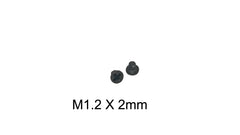 10x M2 x 2mm Phillips Screws for HP EliteBook 840 G6 846 G6 SSD WiFi
$4.99
10x M2 x 2mm Phillips Screws for HP EliteBook 840 G6 846 G6 SSD WiFi
$4.99 -
M2 x 2mm Phillips Flat Head Screw for HP EliteBook 840/846 G6 Laptop Repair - Pack of 100 Black
$7.99
-
 M2 x 2.5mm Screws for Dell XPS 14 9440 M.2 SSD Drive – 10-Pack Black
$4.99
M2 x 2.5mm Screws for Dell XPS 14 9440 M.2 SSD Drive – 10-Pack Black
$4.99 -
M2 x 2.5mm Screws for ASUS ROG Strix G17 G713 SSD WiFi Touchpad 10-Pack Black
$4.99
-
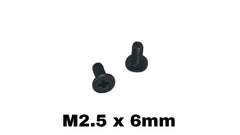 ASUS ROG Strix G15 G513R Replacement Screws Sold Individually – M1.6 x 3mm, M2 x 2.5mm, M2 x 3mm, M2.5 x 6mm Phillips Wafer Head, Black
$0.10Choose size
ASUS ROG Strix G15 G513R Replacement Screws Sold Individually – M1.6 x 3mm, M2 x 2.5mm, M2 x 3mm, M2.5 x 6mm Phillips Wafer Head, Black
$0.10Choose size -
ASUS ROG Strix G17 G713 Replacement Screws Sold Individually – M1.6 x 3mm, M2 x 2.5mm, M2 x 3mm, M2.5 x 6mm Phillips Wafer Head, Black
$0.10Choose size


More in Laptops & PCs
The same screw also fits
Devices whose records share a thread with Dell Inspiron 13 7300, closest length match first.
- Lenovo ThinkPad Yoga 11e Chromebook 3rd Gen also M2 × 2 mm
- Lenovo ThinkPad S420 also M2 × 2 mm
- HP Compaq NX4820 also M2 × 3 mm
- Microsoft Surface Pro kickstand hinge also M2 × 3 mm
- Dell Latitude 9450 2-in-1 also M2 × 3 mm
- Dell Inspiron 11 3185 2-in-1 also M2 × 2 mm
- Lenovo K4350A also M2 × 2.5 mm
- HP ProBook 655 G1 also M2 × 3 mm
Questions about Dell Inspiron 13 7300 screws
- What size screw does Dell Inspiron 13 7300 use?
- M1.2 × 1.5 mm for touchpad (qty 3); M1.2 × 1.8 mm for touchpad (qty 4); M2 × 2 mm for system board (qty 3); M2 × 2.5 mm for battery (qty 5); M2 × 2.5 mm for bracket (qty 1); M2 × 2.5 mm for SSD (qty 1); M2 × 3 mm for I/O board (qty 1); M2 × 3 mm for DC-in (qty 1); M2 × 3 mm for fan (qty 2); M2 × 3 mm for power button (qty 2); M2 × 3 mm for wireless card (qty 1); M2 × 3.5 mm for base cover (qty 3); M2 × 4 mm for display (qty 6); M2 × 4 mm for hinge (qty 3); M2 × 5 mm for base cover (qty 4).
- How long are the screws in Dell Inspiron 13 7300?
- The records range from 1.5 to 5 mm depending on the position, so match each screw to its own hole.
- What is the thread pitch of an M1.2 screw?
- 0.25 mm (coarse), which is the standard pitch for M1.2 machine screws. The tap drill is 0.95 mm and the normal clearance hole is 1.4 mm.
- What screwdriver do I need for Dell Inspiron 13 7300?
- The sources do not name the drive. For M1.2, Phillips heads normally take PH000 / JIS 00 and Torx heads T1–T2.
- Can I use an imperial screw instead of M1.2?
- No. Imperial look-alike: #0-80 UNF (1.52 mm) is the closest imperial screw, but it is bigger — not a substitute. Use a true M1.2 screw so it does not cross-thread or strip the hole.
- Where can I buy replacement screws for Dell Inspiron 13 7300?
- TechSpareWarehouse (our own store) lists M1.2 x 2mm, M2 x 2mm and M2 x 2.5mm, which match lengths in the records above.