Quick answer: Understanding M.2 Screw Sizes (The M2 Standard)
| Screw Size | Common Application |
|---|---|
| M2 x 2.5mm | Some NVMe SSDs, Laptops |
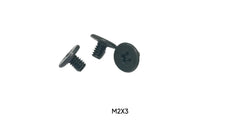
| M2 x 3mm | Most Common for M.2 SSDs |
| M2 x 4mm | M.2 SSDs, Keyboards, Laptop Cases |
| M2 x 5mm | Laptop Cases & other electronics |
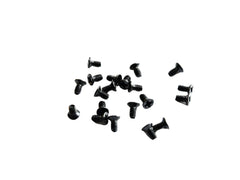
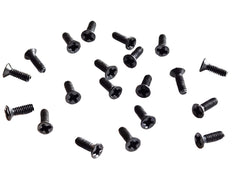
That tiny, elusive M.2 screw is the final piece of your PC puzzle, and it's often missing right when you need it most. Don't worry, you're not alone. This frustrating experience is common among PC builders. The most common size for M.2 screws is M2 x 3mm, typically with a Phillips head. These screws are essential for securing your M.2 solid-state drive (SSD) to the motherboard. This guide will walk you through everything you need to know about these critical components, from identifying the right size to finding a replacement so you can finish your build with confidence.
What Are M.2 Screws and Why Are They So Important?
An M.2 screw is a tiny fastener used to hold an M.2 SSD in place on a motherboard. While your M.2 drive plugs into a dedicated slot, the other end of the drive rests on a standoff and needs to be secured. Without this screw, the drive can become dislodged.
This is critically important for two reasons:
- Stable Connection: The screw ensures the SSD maintains a solid, continuous connection with the M.2 slot. A loose drive could lead to data corruption, system crashes, or a failure to boot.
- Physical Security: It prevents the drive from wiggling or vibrating, which could cause physical damage to the drive's delicate connector or the motherboard's slot over time. Securing it properly is a non-negotiable part of a stable PC build.
Understanding M.2 Screw Sizes (The M2 Standard)
The biggest point of confusion for builders is the exact size of the screw they need. Thankfully, there is a common standard. The vast majority of motherboards use an M2 screw. The "M" stands for metric, and the "2" indicates a 2-millimeter nominal outer diameter.
The full specification includes length, like "M2 x 3mm". This means a 2mm diameter and a 3mm length. While M2 is the standard diameter, the length can vary slightly. We've put together a table to help you identify the right one.
| Screw Size | Common Application | Notes |
|---|---|---|
| M2 x 2.5mm | Some NVMe SSDs, Laptops | A common size for very tight spaces, often found in compact laptops. |
| M2 x 3mm | Most Common for M.2 SSDs | This is the de-facto standard size included with most desktop motherboards. |
| M2 x 4mm | M.2 SSDs, Keyboards, Laptop Cases | A slightly longer screw, also frequently used. It's versatile for more than just SSDs, even being used in keyboards like the Wooting 80HE keyboard. |
| M2 x 5mm | Laptop Cases & other electronics | Often used for device assemblies, such as securing the case on a Dell Inspiron 3535. |
M.2 Standoffs vs. M.2 Screws: What's the Difference?
It's easy to confuse the screw with the standoff. The standoff is a small, typically hexagonal post that screws directly into the motherboard. Its purpose is to elevate the end of the M.2 drive to the correct height. The M.2 screw then fastens the drive down into this standoff.
Most motherboards come with standoffs for different M.2 drive lengths (e.g., 2242, 2260, 2280). You must move the standoff to the correct position for your drive's length before attempting to install the screw.
What to Do If You've Lost Your M.2 Screw
It happens to the best of us. You unbox your motherboard, and the tiny bag with the screw is nowhere to be found. Here’s a checklist of what to do:
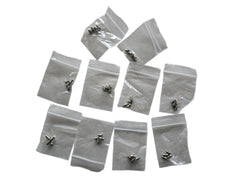
- Triple-Check the Motherboard Box: Search every nook and cranny. These screws are often in a very small, clear baggie taped to the inside of the box, the manual, or an anti-static bag.
- Inspect the Motherboard Itself: Some manufacturers, like Asus and ASRock, have started pre-installing the screw or a tool-less latch directly into one of the standoffs on the board. Look closely at the M.2 slots.
- Buy a Replacement Kit: If it’s truly gone, the best solution is to buy a replacement. A dedicated M.2 screw kit is your most reliable option to ensure you get the correct size and avoid damaging your components.
Where to Buy M.2 Screws and Replacement Kits
Your local hardware store is unlikely to carry screws this small and specific. Your best bet is to find a specialist supplier. At Tech Spare Warehouse, we carry the precise fasteners builders need to get the job done right.
Here are a few excellent options for M.2 SSDs and other small electronic projects:
- For a Perfect Fit: Our pack of M2 x 4mm Phillips Flat Head Carbon Steel Machine Screws for SSD Mounting are specifically engineered for this task. They offer a secure fit for nearly any motherboard and SSD combination.
- For More Versatility: If you work on a lot of electronics, grabbing a set of M2 Phillips Flat Head Carbon Steel Machine Screws with multiple lengths is a smart move. This ensures you have the right size on hand for M.2 drives, laptop cases, and other small devices.
- For MacBook Users: Apple systems use very specific screws. If you're upgrading a MacBook, you'll need a dedicated Hard Drive Screw Kit for MacBook Pro to ensure compatibility and a proper fit.
How to Install an M.2 SSD Screw Correctly
Installing the screw is easy, but it requires a delicate touch. Follow these steps to do it right:
- Power Down and Ground Yourself: Turn off and unplug your PC. Touch a metal part of the case to discharge any static electricity.
- Locate the Slot and Standoff: Find the M.2 slot on your motherboard and ensure the standoff is in the correct position for your SSD's length.
- Insert the M.2 SSD: Slide the SSD into the slot at a 30-degree angle. It should feel snug.
- Press the Drive Down: Gently press the end of the SSD down so the semi-circular notch sits flat on top of the standoff.
- Insert and Tighten the Screw: Using a Phillips #0 or #1 screwdriver (a magnetic tip is a massive help!), carefully thread the M.2 screw into the standoff. Tighten it until it's just snug—do not overtighten! Overtightening can damage the SSD, standoff, or motherboard.
Common Mistakes to Avoid
Avoid these common pitfalls when working with M.2 drives and their screws:
- Using the Wrong Screw Size: Forcing a screw that is too large (like an M3) will damage the standoff threads. A screw that is too small won't secure the drive.
- Forgetting the Standoff: Screwing the drive directly to the motherboard without a standoff will bend and likely destroy your SSD.
- Overtightening the Screw: This is the most common mistake. It can crack the SSD's circuit board or strip the screw head, making it impossible to remove later. Just snug is enough.
- Dropping the Screw: These screws are tiny and love to disappear into the depths of your PC case. Work in a well-lit area and consider laying your case on its side.
Your Build Isn't Finished Without the Final Screw
That tiny piece of metal may seem insignificant, but it plays a huge role in the performance and longevity of your new SSD. Finding the right M.2 screws shouldn't be a roadblock in your PC building journey. By understanding that M2 x 3mm is the most common size and knowing where to source high-quality replacements, you can ensure your drive is secure and your system is stable for years to come.
Ready to find the exact part you need? For all your specialist screw and component needs, from SSD mounting to custom keyboard builds, explore the full catalog at Tech Spare Warehouse.
Frequently Asked Questions
What is the most common M.2 screw size?
The most common M.2 screw size is M2 x 3mm. This means it has a 2mm thread diameter and is 3mm long. Most desktop motherboards that include a screw will provide this size.
Can I use a motherboard without an M.2 screw?
It is highly discouraged. An unsecured M.2 drive can easily come loose from the slot, leading to data loss, system instability, or physical damage to the SSD and motherboard connector.
Are M.2 screws and laptop screws the same?
Sometimes, but not always. Many laptops use M2 screws for their casing or other components, but the length, head type, and thread pitch might differ. It's always best to use a screw specifically intended for M.2 SSD mounting.
Do all motherboards come with M.2 screws?
Most new motherboards include the necessary M.2 screws and standoffs. However, they are incredibly easy to lose in the packaging. Some modern boards now feature tool-less M.2 latches, eliminating the need for a screw entirely.
What screwdriver do I need for an M.2 screw?
You will typically need a small Phillips head screwdriver, usually a size #0 or #1. A screwdriver with a magnetic tip is highly recommended to prevent dropping the tiny screw inside your PC case.
Where is the M.2 screw usually located?
Check for a tiny plastic baggie taped inside the motherboard box or to the anti-static bag. If not there, inspect the motherboard itself—some manufacturers pre-install the screw in one of the standoff locations near the M.2 slots.
Get the complete kit: new NVMe drives rarely include the mounting screw, and boards differ in which length they need. The M.2 SSD Install Kit has 4× M2 x 3mm and 4× M2 x 4mm screws, so you have the right length for a standard standoff or a taller, heatsink-equipped slot, plus spares for the next build.