Quick answer: M.2 Screw Size Comparison
| Screw Size | Thread Diameter | Common Lengths |
|---|---|---|
| M2 | 2mm | 2mm, 3mm, 4mm |
| M2.5 | 2.5mm | 4mm, 5mm, 8mm |
| M3 | 3mm | 5mm, 6mm |
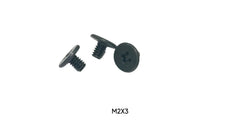
It’s a tale as old as PC building: you’re ready for a lightning-fast storage upgrade, you unbox your new M.2 drive, you go to install it, and… the screw is gone. Vanished. Swallowed by the carpet monster. Don’t worry, you’re not alone. Figuring out which NVMe SSD screws you need can be frustrating, but we have the simple answer. For the vast majority of motherboards and M.2 drives, you need an M2 x 3mm Phillips head screw. This tiny fastener is the key to securing your drive and completing your upgrade, and this guide will cover everything you need to know about it.
Shop the screws in this guide
 M2 x 3mm NVMe Screw, SingleView & buy →
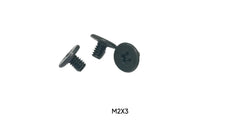
M2 x 3mm NVMe Screws, 100-PackView & buy →
M2 x 3mm NVMe Screw, SingleView & buy →
M2 x 3mm NVMe Screws, 100-PackView & buy →
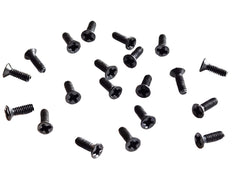
 M.2 SSD Install Kit (M2 x 3mm + M2 x 4mm)View & buy →
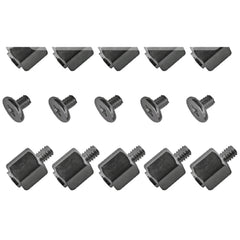
 M.2 Standoff + Screw Kit, 10 SetsView & buy →
See all M.2 SSD screws & standoffs.
What Are NVMe SSD Screws, Anyway?
An NVMe SSD screw is a tiny machine screw used to fasten an M.2 solid-state drive to a motherboard. Unlike traditional 2.5-inch SSDs that use a SATA data and power cable, M.2 drives plug directly into a dedicated slot on the motherboard, sitting parallel to it. The screw doesn't hold the entire drive’s weight; instead, it secures the far end of the drive to a pre-installed anchor point called a standoff. This prevents the drive from popping out of its socket and ensures a stable, reliable connection.
The Big Question: What Size is the NVMe SSD Screw?
While M.2 is a standard, there can be slight variations in the screws required. However, the differences are minimal, and one size fits most. Let's break it down.
The De Facto Standard: M2 Screws
The "M" in screw sizes stands for metric. The number that follows, in this case, "2," refers to the screw's diameter in millimeters. So, an M2 screw has a 2mm diameter. This is, by far, the most common thread size for M.2 drives.
The length can vary slightly, but it's usually between 2mm and 4mm. The most common and widely compatible size is M2 x 3mm. If you buy a pack of these, you'll be set for almost any build. If you're building a small arsenal of parts for future projects, having a variety of fasteners is always a good idea. Consider grabbing the M.2 SSD install kit, which has both M2 x 3mm and M2 x 4mm screws.
What About M3 or M2.5 Screws?
You might see M3 screws mentioned in PC building guides, but these are typically used for securing 2.5-inch or 3.5-inch drives, or for fastening the motherboard to the case. They have a larger 3mm diameter and will not fit into an M.2 standoff. Attempting to force one will strip the standoff, causing a much bigger headache. Likewise, M2.5 screws are common in some electronics like the Raspberry Pi 5 but are not typically used for M.2 drives.
M.2 Screw Size Comparison
Here’s a simple table to help you visualize the differences and know what to look for.
| Screw Size | Thread Diameter | Common Lengths | Typical Use Case |
|---|---|---|---|
| M2 | 2mm | 2mm, 3mm, 4mm | NVMe/SATA M.2 SSDs, some laptop components |
| M2.5 | 2.5mm | 4mm, 5mm, 8mm | Some laptops, Raspberry Pi, small electronics |
| M3 | 3mm | 5mm, 6mm | 2.5" SSDs, 3.5" HDDs, Motherboard mounting |
Standoffs vs. Screws: What's the Difference?
This is a common point of confusion. The standoff and the screw are two separate parts that work together.
- The Standoff: This is a small, typically hexagonal post that screws directly into the motherboard. Motherboards have several standoff mounting points to accommodate different M.2 drive lengths (e.g., 2242, 2260, 2280). Its job is to provide the correct height and a threaded hole for the screw.
- The Screw: This is the tiny M2 screw we've been discussing. It goes through the notch at the end of your M.2 drive and into the top of the standoff, holding the drive in place.
Most motherboards come with the standoffs and screws in a tiny plastic bag. Some higher-end boards may have them pre-installed or feature tool-less mechanisms.
How to Install an NVMe SSD (Without Losing the Screw!)
Here’s a simple, step-by-step guide to a successful installation.
- Safety First: Power down your computer, unplug it from the wall, and press the power button a few times to discharge any residual electricity.
- Locate the M.2 Slot: Find the M.2 slot on your motherboard. It’s a short, horizontal connector. If you have a heatsink over it (common on modern boards), you’ll need to unscrew that first.
- Position the Standoff: Check the length of your M.2 drive (it's usually printed on it, e.g., 2280 for a 22mm x 80mm drive). Make sure the standoff is screwed into the corresponding hole on the motherboard.
- Insert the Drive: Gently slide the M.2 drive’s gold contacts into the slot at a roughly 30-degree angle. It should only fit one way.
- Secure the Drive: Press the end of the drive down so it lies flat. The semi-circular notch on the end of the drive should now be sitting directly on top of the standoff.
- The Final Step: Using a #0 or #1 Phillips head screwdriver (preferably magnetic), carefully drive the M2 screw into the standoff. Just make it snug—do not overtighten!
Where to Find Replacement NVMe SSD Screws
So, you’ve confirmed the screw is lost for good. The good news is that they are easy to find and inexpensive. You rarely buy just one, which is great because having spares is a lifesaver.
At Tech Spare Warehouse, we specialize in these small but crucial parts. Here are our top recommendations:
- For Most PC Builds: The most straightforward option is the screw your slot was designed for: an M2 x 3mm NVMe screw (also in a 100-pack). If your standoff is taller, the M.2 SSD install kit adds M2 x 4mm screws.
- For Laptop Upgrades: Laptops can be particular. While many use standard M2 screws for their SSDs, they often use slightly different sizes for case assembly. If you're working on a Dell, for instance, having screws like these M2 x 5mm Phillips Flat Head Carbon Steel Machine Screws for a Dell Inspiron 3535 Case on hand can be invaluable.
What If My Motherboard Came Without Screws?
First, double-check the box! The screws are usually in a very small bag tucked inside the manual or alongside the SATA cables. Some motherboards, especially from brands like ASUS, MSI, and Gigabyte, now include tool-less M.2 installation hardware. These use a rotating plastic latch or clip that you simply turn to secure the drive, no screw needed.
If they are truly missing and you don’t have a tool-less system, you’re not out of luck. You can easily order a replacement kit online. It's much more reliable than trying to find a matching screw at a local hardware store, where metric screws this small are rarely stocked.
Conclusion: The Tiny Screw That Makes a Big Difference
While it may seem like an insignificant piece of metal, using the correct NVMe SSD screws is crucial for a secure and stable PC. Remember, the standard size is M2 x 3mm, and you should never force a screw that doesn’t fit. Overtightening is just as bad. With a gentle hand and the right part, your super-fast storage will be up and running in no time. For all your replacement screws, standoffs, and other essential PC building components, be sure to check out the extensive catalog at Tech Spare Warehouse!
Frequently Asked Questions
What is the M.2 screw size?
The most common M.2 screw size for NVMe and SATA SSDs is an M2 x 3mm Phillips head screw. M2 refers to the 2mm thread diameter, and 3mm is the length.
Are all NVMe screws the same?
No, but the vast majority use the M2 thread size. The length can vary slightly (e.g., 2mm, 3mm, 4mm), and some proprietary systems like Apple MacBooks use different screws. However, an M2 screw will work for most desktop motherboards.
Can I install an NVMe SSD without the screw?
It is strongly not recommended. Without the screw, the drive is only held in by the slot's tension and can easily pop out, leading to data corruption or physical damage. The exception is motherboards with built-in tool-less latches.
Do motherboards come with NVMe SSD screws?
Yes, almost all motherboards include the necessary M.2 screw and standoff. They are typically found in a small, labeled plastic bag inside the motherboard box. However, they are tiny and easy to lose.
What's the difference between an M.2 screw and a standoff?
The standoff is the anchor point that screws into the motherboard itself to provide height and a secure base. The M.2 screw is the smaller screw that goes through the SSD's notch and fastens it to the standoff.
Is an NVMe screw the same as a laptop screw?
Sometimes, yes. Many laptops use M2 screws for various components, including the M.2 SSD. However, case screws and other internal fasteners can be different sizes, such as the M2 x 5mm screws used in some Dell models. Always verify the specific size needed for your device.
Where can I buy a single NVMe screw?
Right here: we sell the M2 x 3mm NVMe screw individually, but a small pack is more practical: the 100-pack or the M.2 SSD install kit gives you spares for future builds or upgrades.