Dell S2425H monitor screw size
M2 / M3 / M4 · 3.3 to 11 mm long
The screws used on Dell S2425H monitor are M2, M3 and M4 in lengths from 3.3 to 11 mm.
There are 7 separate fitment records for it, including joystick / OSD key board retention (2) (M2), chassis / panel screws 1-15 (M3) and chassis / panel screws 1-6 (M3), plus 4 more in the table below.
7 of the 7 records are marked confirmed, drawn from 1 source (Dell S2425H Simplified Service Manual).
For reference, M2 is 2 mm across the threads at 0.4 mm pitch. The imperial size people confuse it with: #2-56 UNC (2.18 mm) is close but not interchangeable.
Dell S2425H monitor screw specifications
One row per fitment record. Head, drive and torque are shown only where the source states them; pitch is the ISO coarse pitch for the thread.
| Thread | Length | Pitch | Head | Drive | Torque | Where it goes | Status |
|---|---|---|---|---|---|---|---|
| M2 | 3.3 mm | 0.4 mm | not stated | not stated | not stated | joystick / OSD key board retention (2) | Confirmed |
| M3 | 4 mm | 0.5 mm | not stated | not stated | not stated | chassis / panel screws 1-15 | Confirmed |
| M3 | 8 mm | 0.5 mm | not stated | not stated | not stated | chassis / panel screws 1-6 | Confirmed |
| M3 | 6 mm | 0.5 mm | not stated | not stated | not stated | rear cover screws 1-5 | Confirmed |
| M4 | 10–11 mm | 0.7 mm | not stated | not stated | 10 kgf-cm | stand / back cover screws 1-4 | Confirmed |
| M4 | 8 mm | 0.7 mm | not stated | not stated | not stated | stand / back cover screws 5-6 | Confirmed |
| M4 | 8 mm | 0.7 mm | not stated | not stated | not stated | main / power board ground screw | Confirmed |
Fitment records and sources
joystick / OSD key board retention (2)
pitch 0.4 mm · tap 1.6 mm · clearance 2.4 mm · PH0 / Torx T6
chassis / panel screws 1-15
pitch 0.5 mm · tap 2.5 mm · clearance 3.4 mm · PH1 / Torx T10
chassis / panel screws 1-6
pitch 0.5 mm · tap 2.5 mm · clearance 3.4 mm · PH1 / Torx T10
rear cover screws 1-5
pitch 0.5 mm · tap 2.5 mm · clearance 3.4 mm · PH1 / Torx T10
stand / back cover screws 1-4
pitch 0.7 mm · tap 3.3 mm · clearance 4.5 mm · PH2 / Torx T20
stand / back cover screws 5-6
pitch 0.7 mm · tap 3.3 mm · clearance 4.5 mm · PH2 / Torx T20
main / power board ground screw
pitch 0.7 mm · tap 3.3 mm · clearance 4.5 mm · PH2 / Torx T20
How to check the screw before you buy
- For a wall or arm mount, the screw has to engage the threaded insert by several turns but must not bottom out, so measure the insert depth and add the thickness of the bracket and any spacers.
- Diameter: across the threads an M2 screw measures about 2 mm with calipers (usually a hair under). This device also uses M3 / M4, so measure each screw rather than assuming they match.
- Pitch: 0.4 mm from one thread crest to the next (25 crests per centimetre). A thread pitch gauge or the pitch-gauge tool settles it in seconds.
- Length: measure from under the head to the tip for pan, button, wafer and cap heads; countersunk (flat) heads are measured overall.
- The records span 3.3–11 mm, which means different positions take different lengths — match each hole to its own screw.
- Driver: the source does not name the drive. Standard M2 heads take PH0 for Phillips and T6 for Torx, and a 1.5 mm hex key for socket heads; a bit that fits loosely will cam out and strip the head.
Common mix-ups with M2 / M3 / M4
- Xbox Series X internal chassis screws are M3, not M2 (confirmed on iFixit) — a widespread misconception.
- LED strip clips strip easily — M3x12 into thin plastic should be hand-driven, never with a power driver.
- Some rackmount KVM switch kits pair M4x10 bracket-to-rack screws with M3.2x4.5 bracket-to-chassis screws (non-standard M3.2, not a true M3), so kits are not fully interchangeable with generic M3/M4 hardware.
Buy these screws at TechSpare Warehouse
In stock and shipped from South Carolina. Our black screws are Phillips wafer head (low profile); match the head style and length to the original before you order.
-
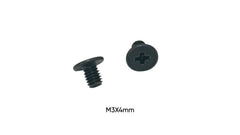 M3 x 4mm Phillips Wafer Head Screws for 2.5 SATA SSD Mounting 10-Pack
$4.99
M3 x 4mm Phillips Wafer Head Screws for 2.5 SATA SSD Mounting 10-Pack
$4.99 -
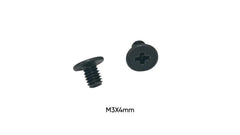 M3 x 4mm Screws for Installing SSD into Synology NAS 10-Pack
$4.99
M3 x 4mm Screws for Installing SSD into Synology NAS 10-Pack
$4.99 -
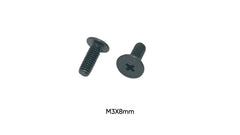 M3 x 8mm Screws for Leather Spike Attachments Guitar Straps 10-Pack
$4.99
M3 x 8mm Screws for Leather Spike Attachments Guitar Straps 10-Pack
$4.99 -
 M3 x 8mm Phillips Wafer Head Screw for SLA Resin 3D Printer VAT Film - Single Replacement Black
$0.10 each · min. 50
M3 x 8mm Phillips Wafer Head Screw for SLA Resin 3D Printer VAT Film - Single Replacement Black
$0.10 each · min. 50
-
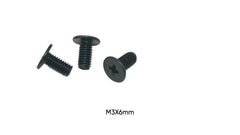 M3 x 6mm Replacement Screws for XLR Audio Connectors Phillips Wafer Head 50-Pack
$4.99
M3 x 6mm Replacement Screws for XLR Audio Connectors Phillips Wafer Head 50-Pack
$4.99 -
M3 x 6mm Phillips Wafer Head Carbon Steel Machine Screws for XLR Audio Connectors | 50-Pack (Black)
$4.99
-
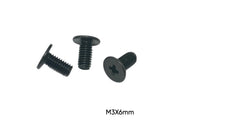 M3 x 6mm Phillips Wafer Head Screw for 3D Printer Frame Assembly - Single Replacement Black
$0.10 each · min. 50
M3 x 6mm Phillips Wafer Head Screw for 3D Printer Frame Assembly - Single Replacement Black
$0.10 each · min. 50
-
 M3 x 6mm Phillips Wafer Head Screw for Boutique Guitar Pedal Enclosure - Single Replacement Black
$0.10 each · min. 50
M3 x 6mm Phillips Wafer Head Screw for Boutique Guitar Pedal Enclosure - Single Replacement Black
$0.10 each · min. 50


More in Displays, TVs & Mounts
The same screw also fits
Devices whose records share a thread with Dell S2425H monitor, closest length match first.
- Dell E2014T also M3 × 6 mm
- Dell U2719D also M3 × 8 mm
- LG 28TL510S also M4 × 10 mm
- LG 32LJ500B also M4 × 10 mm
- Dell P2012H also M3 × 6 mm
- Elo Z20 POS stand Gen2 (E378179) also M3 × 6 mm
- Soundbar drivers and boards also M3 × 8 mm
- Dell P2314H also M3 × 6 mm
Questions about Dell S2425H monitor screws
- What size screw does Dell S2425H monitor use?
- M2 × 3.3 mm for joystick / OSD key board retention (2); M3 × 4 mm for chassis / panel screws 1-15; M3 × 8 mm for chassis / panel screws 1-6; M3 × 6 mm for rear cover screws 1-5; M4 × 10–11 mm for stand / back cover screws 1-4; M4 × 8 mm for stand / back cover screws 5-6; M4 × 8 mm for main / power board ground screw.
- How long are the screws in Dell S2425H monitor?
- The records range from 3.3 to 11 mm depending on the position, so match each screw to its own hole.
- What is the thread pitch of an M2 screw?
- 0.4 mm (coarse), which is the standard pitch for M2 machine screws; a 0.25 mm fine pitch exists but is uncommon. The tap drill is 1.6 mm and the normal clearance hole is 2.4 mm.
- What screwdriver do I need for Dell S2425H monitor?
- The sources do not name the drive. For M2, Phillips heads normally take PH0 and Torx heads T6; socket heads take a 1.5 mm hex key.
- Can I use an imperial screw instead of M2?
- No. Imperial look-alike: #2-56 UNC (2.18 mm) is close but not interchangeable. Use a true M2 screw so it does not cross-thread or strip the hole.
- How tight should the M4 screw on Dell S2425H monitor be?
- The source gives 10 kgf-cm for stand / back cover screws 1-4.
- Where can I buy replacement screws for Dell S2425H monitor?
- TechSpareWarehouse (our own store) lists M3 x 4mm, M3 x 8mm and M3 x 6mm, which match lengths in the records above.