Quick answer: fit a standoff only into the case holes that line up with your motherboard's mounting holes. Thread each one in by hand, then snug it with a hex nut driver or pliers. Lower the board onto the standoffs and fix it with one screw per hole. For an M.2 SSD, put the small M.2 standoff in the hole that matches your drive's length (2230, 2242, 2260 or 2280), seat the drive at an angle, press it down, and secure it with an M2 screw.
What a standoff does
A standoff is a threaded spacer. It holds a circuit board a few millimetres above a metal surface, so the solder joints on the back of the board can't touch the case and short out. Desktop cases use them under the motherboard. Motherboards use a much smaller one at the end of each M.2 slot.
How to install desktop motherboard standoffs
- Find your board's mounting holes. Lay the motherboard (still in its anti-static bag) over the motherboard tray, or compare it with the tray markings. Full-size ATX boards usually have nine holes, and smaller boards have fewer.
- Check which standoffs are already fitted. Many cases come with some installed. Remove any standoff that has no matching hole in your board. A stray standoff under the board can short it.
- Thread the remaining standoffs in by hand. They should turn easily. If one binds, back it out and try again so you don't cross-thread the tray.
- Snug them gently with a hex nut driver or pliers. They only need to be firm. Overtightening strips the thin tray metal.
- Fit the I/O shield (if your board has a separate one), then lower the board in at a slight angle so the ports slide into the shield.
- Start every screw by hand before you tighten any of them, then tighten in a cross pattern until each is snug.
Desktop standoffs and their screws are usually supplied with the case. The screw that holds the board to the standoff varies by case. Our motherboard mounting screws guide explains how to tell the common sizes apart.
How to install an M.2 standoff and SSD
- Check the drive length. The last four digits of the M.2 size are the length in millimetres: 2230 = 30mm, 2242 = 42mm, 2260 = 60mm, 2280 = 80mm.
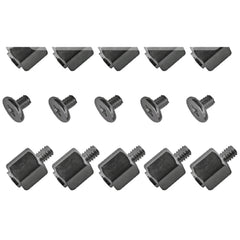
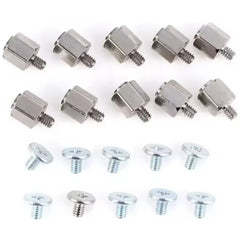
- Move the standoff to the matching hole. Most slots have a hole for each length. If your board shipped without a standoff, or you lost it, use a black M.2 standoff kit or the silver/black M.2 standoff and screw kit (10 sets each).
- Insert the SSD into the slot at about 30 degrees, with the contacts fully in.
- Press the far end down onto the standoff. Don't use the screw to pull the board down.
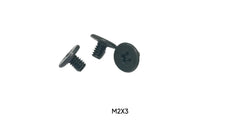
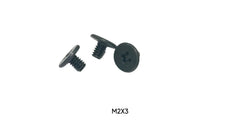
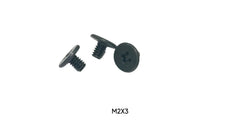
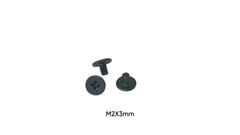
- Drive the M2 screw until it is just snug. M2 threads strip easily.
M.2 standoff and screw parts
| Part | Size | Order |
|---|---|---|
| M.2 standoff + screw kit, black | 10 sets | View kit |
| M.2 standoff + screw kit, silver/black | 10 sets, M2 x 4.5 + 2.5mm standoff | View kit |
| M.2 SSD install kit | 8 screws: M2 x 3mm + M2 x 4mm | View kit |
| M.2 SSD securing screws | M2 x 3mm, 50-pack | View pack |
| M.2 SSD installation screws | M2 x 3mm, 100-pack | View pack |
| ASUS TUF Z270 motherboard, SSD install | M2 x 5mm, 100-pack | View pack |
| Samsung 860 EVO M.2 SSD | M2 x 3mm, 10-pack | View pack |
More sizes are in M.2 Screws for SSDs. For a closer look at M.2 standoffs, read what is an M.2 standoff.
Laptop motherboards
Laptops usually don't use separate standoffs. The board screws straight into threaded posts moulded into the chassis. If a laptop board screw is missing, these are the sizes we stock for motherboard mounting:
| Size | Order |
|---|---|
| M2 x 3mm | Laptop motherboard screws, 100-pack |
| M2.5 x 6mm | 10-pack, single |
Not sure if a hole is M2 or M2.5? See M2 vs M2.5 vs M3 screws.
Common mistakes
- An extra standoff under the board with no hole above it. This is the classic cause of a new build that won't power on.
- Missing standoffs, which leave the board flexing when you plug in RAM or cables.
- Cross-threading by starting a standoff or screw with a driver instead of your fingers.
- No M.2 standoff, so the SSD screw has nothing to thread into and the drive springs up.
- Overtightening M2 and M2.5 screws until the threads strip.
FAQ
Do I need standoffs for my motherboard?
Yes, in any metal case where the board would otherwise touch the tray. Many cases ship with them partly pre-installed. Just make sure they line up with your board's holes.
What size is an M.2 standoff screw?
The screw that holds an M.2 SSD is M2. Desktop boards most often use M2 x 3mm, and some laptops and boards use M2 x 2mm to M2 x 5mm.
How tight should standoffs be?
Firm by hand plus a light snug with a driver. They don't carry load sideways, and stripping a case tray is a far bigger repair.
My motherboard has a hole with no standoff under it. Is that OK?
Add a standoff if the tray has a threaded hole there, so the board is supported. If the tray has no hole at that spot, leave it empty.
Do you ship fast?
Free US shipping on orders of $10 or more, and orders are processed and shipped within 24 hours (Monday–Saturday).