Quick answer: A Closer Look: Screw Heads, Drives, and Materials
| Head/Drive Type | Description |
|---|---|
| Socket Head (Hex/Allen) | A tall, cylindrical head with an internal hex (Allen) drive. |
| Button Head | A low-profile, dome-shaped head, often with a hex drive. |
| Flat Head (Countersunk) | A cone-shaped head designed to sit flush within a countersunk hole. |
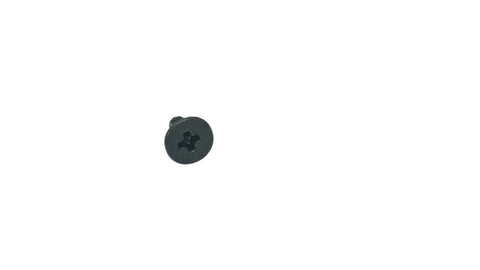
| Phillips Head | The classic cross-shaped drive, often found in a flat or pan head form. |
Getting your 3D printer dialed in for perfect prints requires precision, and that starts with the literal nuts and bolts of your machine. The most common 3d printer screws are metric types, specifically M3, M4, and M5 screws, which are used to fasten everything from the main frame and stepper motors to the extruder assembly and end-stops. Using the correct size, length, and type of screw is non-negotiable for structural integrity and preventing wobbly, inaccurate prints. This guide will walk you through everything you need to know.
Why the Right 3D Printer Screws Are Non-Negotiable
It might be tempting to rummage through your spare hardware jar to find a screw that "just fits," but this is a recipe for disaster. 3D printers are precision machines that vibrate and move rapidly. Using the wrong fastener can lead to a host of problems:
- Poor Structural Integrity: A loose frame from incorrect screws will cause ghosting, layer shifting, and dimensional inaccuracies in your prints.
- Component Damage: Using a screw that's too long can damage electronic components or crack plastic parts. Overtightening the wrong head type can strip the screw or the part it's threaded into.
- Vibration and Loosening: The constant vibration of a printer can cause improperly sized screws to back out over time, leading to sudden failures.
In short, the quality and correctness of your hardware are just as important as the quality of your filament or the calibration of your E-steps. Every screw has a purpose.
Common 3D Printer Screw Sizes: M3, M4, and M5 Explained
While printers vary, a vast majority of desktop FDM printers (like those from Creality, Prusa, and AnkerMake) rely on a standard set of metric screws. Let's break down the most common sizes.
M3 Screws: The Workhorse of 3D Printers
M3 screws are the most prolific hardware on most 3D printers. Their small size makes them ideal for mounting lighter components.
- Common Uses: Securing extruder components, attaching part cooling fans, mounting circuit boards (like the mainboard), and fastening end-stop switches.
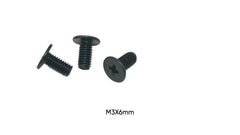
- Pro Tip: M3 is a universally common size in small electronics. For example, high-quality M3 x 6mm Phillips Flat Head screws for XLR audio connectors use the same threading you'll find on your printer, showcasing how universal this size is.
M4 Screws: For Structure and Stability
When you need a bit more clamping force and rigidity, M4 screws are the next step up. They are often found connecting parts that form the printer's core structure.
- Common Uses: Assembling frame extrusions, mounting stepper motors, and securing bed carriages.
M5 Screws: The Heavy Lifters
M5 screws are the largest and strongest of the common trio. They are used for the most critical, high-stress parts of the printer's frame and motion system.
- Common Uses: Bolting major frame components together, securing gantries, and in some cases, used as part of the Z-axis lead screw assembly.
A Closer Look: Screw Heads, Drives, and Materials
Beyond diameter and length, the type of head and drive on the screw is crucial. It determines the tool you'll use and how the screw sits in the final assembly.
| Head/Drive Type | Description | Common Use Case |
|---|---|---|
| Socket Head (Hex/Allen) | A tall, cylindrical head with an internal hex (Allen) drive. | The most common type on 3D printers for frame assembly and motor mounts. |
| Button Head | A low-profile, dome-shaped head, often with a hex drive. | Used where clearance is tight or a smoother appearance is desired. |
| Flat Head (Countersunk) | A cone-shaped head designed to sit flush within a countersunk hole. | Used for mounting bed surfaces, screens, and panels for a clean, flat finish. |
| Phillips Head | The classic cross-shaped drive, often found in a flat or pan head form. | Less common for structural parts but often used for electronics and case screws. |
Just as you need specific screws for a custom PC build, like M2 x 4mm Phillips screws for SSD mounting, your printer needs its specific types for optimal performance. You can't just swap a socket head for a flat head without consequences to the fit.
How to Choose the Right Screws for Your Project
Whether you're assembling a printer from a kit, performing a repair, or adding an upgrade, using the correct fastener is key. Many DIY enthusiasts and makers work on more than just printers, finding themselves needing a variety of small, precision fasteners for different hobbies.
The same eye for detail needed for your printer applies elsewhere. For instance:
- Building a custom mechanical keyboard? You'll need specific hardware like these M2 x 4mm screws designed for a Wooting 80HE to get the job done right.
- Working on a single-board computer project? Securing the case often requires high-quality M2.5 x 8mm screws for a Raspberry Pi 5 to avoid damage.
- Upgrading a laptop? You can't risk using the wrong hardware. Using a specific kit like these hard drive screws for an Apple MacBook Pro ensures a perfect fit.
For general-purpose electronics work, having a versatile set of fasteners, such as a collection of M2 Phillips Flat Head Carbon Steel Machine Screws, can be a lifesaver. Always measure the required diameter and length and match the head type before buying.
Common Mistakes to Avoid
- Overtightening: This is the #1 mistake. It can strip the threads in a plastic part, crack the component, or strip the screw head itself. Tighten until snug, and then stop.
- Using the Wrong Driver: Using a Phillips driver on a hex screw (or vice versa) is a surefire way to strip the head, making the screw impossible to remove. Always use the correct, high-quality tool.
- Ignoring a Screw's Material: Most printer screws are alloy or carbon steel with a black oxide finish. Don't replace them with softer materials that can't handle the stress.
- Guessing the Length: A screw that's too short won't engage enough threads, while one that's too long can bottom out and damage underlying components. Measure twice, order once.
Conclusion: Build it Right From the Start
From the frame to the extruder, 3d printer screws are the unsung heroes that hold your entire machine together. Understanding the roles of M3, M4, and M5 screws, along with their various head types and lengths, is fundamental to building, maintaining, and upgrading your printer successfully. Always prioritize using the correct, high-quality hardware to ensure your prints are precise and your machine is reliable for years to come.
For all your specialized hardware and spare part needs, from precision machine screws to components for all your other DIY electronics projects, explore the catalog at Tech Spare Warehouse today!
Frequently Asked Questions
What are most 3D printer screws?
Most consumer 3D printers use metric screws, primarily M3, M4, and M5 socket head cap screws made from black oxide-coated alloy steel. The exact mix depends on the printer model.
Can I use any screw for my 3D printer?
No. You must use a screw with the correct diameter, thread pitch, length, and head type for the specific component. Using the wrong one can lead to poor performance or damage.
What does M3 x 8mm mean?
This designation for a metric screw means it has a nominal diameter of 3 millimeters (M3) and a length of 8 millimeters from the base of the head to the tip.
What's the difference between a button head and a socket head screw?
A socket head screw has a tall, cylindrical shape, providing lots of surface for a tool to grip. A button head screw has a low-profile, rounded dome shape, which is used when there is less clearance.
Why are my 3D printer screws becoming loose?
Screws can become loose due to the constant vibration of the printer. This can be prevented by ensuring they are tightened correctly and by periodically checking them. Some users also apply a small amount of threadlocker for critical, non-adjustable screws.
Where can I buy high-quality 3d printer screws?
You can buy individual or kitted 3d printer screws from dedicated 3D printing stores, large online marketplaces, or specialized electronic hardware suppliers like Tech Spare Warehouse, which stocks a wide variety of fasteners.