Quick answer: Bottom case screw sizes by laptop model
| Laptop | Bottom cover screw | Listing |
|---|---|---|
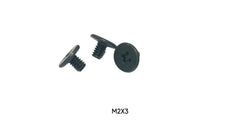
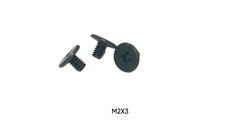
| Dell XPS 13 9340 | M2 x 3mm | 10-pack (base cover + SSD shield) |
| Dell XPS 14 9440 | M2 x 3mm | 10-pack |
| Dell XPS 15 | M2 x 3mm | 50-pack |
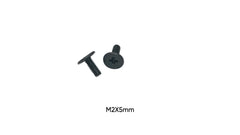
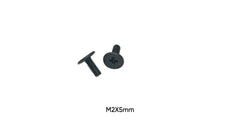
| Dell Inspiron 3535 | M2 x 5mm | 10-pack |
| Dell Inspiron 15 3520 | M2 x 5mm | 10-pack (base cover + fan) |
| ASUS ROG Strix G15 G513RX | M2.5 x 6mm | 10-pack |
The bottom cover is the part of a laptop that gets opened most: for RAM, SSD and battery swaps, fan cleaning and every repair in between. Its screws are also the ones most often lost, stripped, or put back in the wrong holes. This buying guide shows which bottom case screw each common laptop takes, how to tell sizes apart when your model is not listed, and when a single screw, a model pack or a full kit makes the most sense.
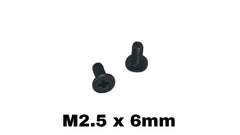
All sizes below come from the titles of products we stock. Every screw is a Phillips flat (countersunk) head in black carbon steel, and lengths are measured from the top of the head to the tip.
Bottom case screw sizes by laptop model
| Laptop | Bottom cover screw | Listing |
|---|---|---|
| Dell XPS 13 9340 | M2 x 3mm | 10-pack (base cover + SSD shield) |
| Dell XPS 14 9440 | M2 x 3mm | 10-pack |
| Dell XPS 15 | M2 x 3mm | 50-pack |
| Dell Inspiron 3535 | M2 x 5mm | 10-pack |
| Dell Inspiron 15 3520 | M2 x 5mm | 10-pack (base cover + fan) |
| ASUS ROG Strix G15 G513RX | M2.5 x 6mm | 10-pack |
| ASUS ROG Strix G17 G713 | M2.5 x 6mm | 10-pack |
| Acer Nitro 5 | M2.5 x 6mm | 25-pack |
| HP Fortis 14 G11 Chromebook | M2 x 8mm | 10-pack |
| MacBook Pro A1278 / A1286 / A1297 | Apple 922-8666 set | 10 sets (100 pieces) |
| Generic / unlisted laptops | M2.5 x 5, 6, 8, 10 or 12mm | 5mm, 6mm, 8mm, 10mm, 12mm singles |
| Repair benches | M2.5 x 6mm | 50 or 100 pieces |
Two things stand out. First, thin premium laptops such as the Dell XPS line use short M2 screws, while gaming laptops like the ROG Strix and Nitro 5 use the heavier M2.5. Second, the same brand can use different sizes from one model to the next, so the brand alone is not enough to order by.
How to identify a bottom case screw yourself
1. Thread diameter
Hold the screw against a ruler or use calipers. About 2mm across the threads is M2; about 2.5mm is M2.5. The difference is small but decisive: an M2 screw spins loose in an M2.5 hole, and an M2.5 screw won't start in an M2 hole. If in doubt, compare it side by side with a screw from a neighbouring hole on the same cover.
2. Length
Measure from the top of the flat head to the tip. Bottom covers very often use two or three lengths. The longer ones typically sit along the hinge edge or in raised bosses, and the shorter ones near the front. Before you take the cover off, photograph it or lay the screws out in the same pattern, so each goes back in its own hole.
3. Head and drive
All of the screws above are flat Phillips heads. MacBook Pro unibody bottom cases use Phillips screws too, but newer MacBooks use pentalobe screws, and some business laptops use captive screws that stay in the cover. If your cover has captive screws, you only need a replacement if the screw has come out of its retaining clip.
Single screws, model packs or a full kit?
- One or two missing: buy singles in the matching M2.5 length, or a model 10-pack if your laptop is in the table. A 10-pack costs little more and covers future losses.
- Several missing or mixed up: a model pack is the safe choice, because every screw in it is the right length for that cover.
- Whole laptop rebuild: a laptop screw kit bundles the cover screws with the internal sizes. Kits are available for the Dell XPS 13/14/15/16, Acer Nitro 5, Alienware m15/m17/x16, Dell Inspiron/Latitude/Precision and school Chromebooks.
- Refurbishing many units: the M2.5 x 6mm set in 50 or 100 pieces.
Browse all cover screws in Laptop Bottom Case Screws, and the screws behind the cover (SSD, Wi-Fi, fan, motherboard) in Laptop Internal Screws. For MacBook Pro unibody repairs, the replacement rubber feet are worth replacing at the same time.
Fitting tips
- Start every screw by hand for the first turn or two. Laptop bosses are often plastic or thin metal inserts, and cross-threading is easy.
- Tighten in a cross pattern, so the cover seats evenly, then stop at snug. Over-tightening strips inserts and can crack the cover. See our laptop screw torque guide.
- If a screw is already stripped and won't come out, follow how to remove a stripped laptop screw before ordering, so you know whether the hole is still usable.
- Never put a long screw in a short hole. If the cover does not sit flat, a screw is in the wrong place.
FAQ
What size are laptop bottom case screws?
Most are M2 or M2.5, in lengths from about 3mm to 12mm. Thin laptops lean towards M2 x 3mm; larger and gaming laptops towards M2.5 x 5–8mm. Check the table above for specific models.
Are laptop bottom screws the same across brands?
No. Sizes differ between brands and between models of the same brand. Read more in are laptop screws interchangeable between brands.
Can I use a slightly longer screw if that's all I have?
Not in a laptop cover. Extra length can press into the keyboard, battery or board from below. Use the original length or shorter.
Do you sell the MacBook Pro bottom case screws individually?
The MacBook Pro A1278/A1286/A1297 screws come as complete sets, 10 sets in a pack, so each laptop gets a matching set.
My laptop isn't in the table. What should I do?
Measure one remaining screw as described above, try the Screw Size Finder, or contact us with your model number.