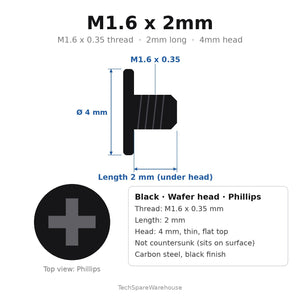
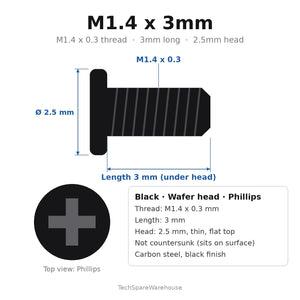
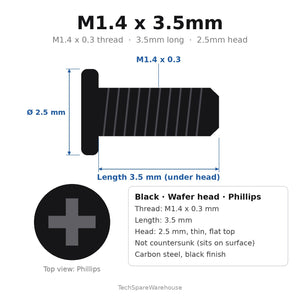
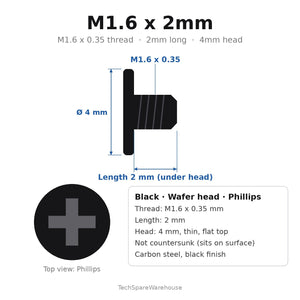
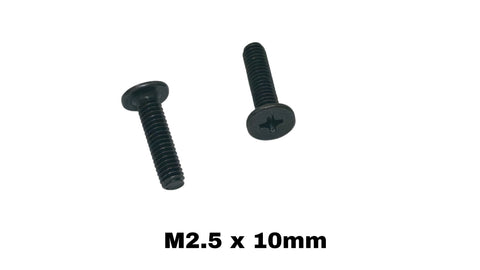
Quick answer: as a starting point, use a PH000 bit for M1.2 to M1.4 screws, PH00 for M1.6 to M2, PH0 for M2.5 and small M3 heads, and PH1 for larger M3 heads. Head size and recess depth vary, so always test-fit: the right bit fills the cross recess with no wobble. Torx and pentalobe screws need their own bits, sized by the recess rather than the thread.
Most stripped screw heads in electronics repair come from a bit one size too small. It feels like it fits, but it only touches the recess at its tips and cams out as you turn. Matching the bit to the screw is the cheapest repair insurance you can buy.
Phillips bit sizes for small screws
| Bit | Typical screw sizes | Where you see them |
|---|---|---|
| PH000 | M1.0 to M1.4 | Glasses, watches, micro drones, tiny camera screws |
| PH00 | M1.6 to M2 | Laptop internals, M.2 SSD screws, keyboards, small drones |
| PH0 | M2.5 to M3 (small heads) | Laptop bases, 2.5" drives and caddies, Raspberry Pi cases |
| PH1 | M3 (larger heads) to M4 | PC components, 3D printers, RC chassis |
| PH2 | 6-32 case screws and larger | Desktop PC cases, power supplies |
These pairings are typical rather than fixed. A low-profile M2 head may take a PH0, and a small-headed M3 may want a PH00. The fit test below settles it.
The ten-second fit test
- Seat the bit in the recess without turning.
- Wiggle the handle gently. A correct bit barely moves. A small bit rocks visibly.
- Look from the side. The bit's tip should reach the bottom of the recess, and its flanks should fill all four arms of the cross.
- If two sizes both seem to fit, use the larger one.
Torx bits
Torx (six-lobed star) screws are common in newer laptops, game consoles and hard drives. Small sizes run T3, T4, T5, T6, T8 and up. Torx bits are sized by the star, not by the screw thread, so match the bit to the recess. Torx resists cam-out much better than Phillips. See our Torx T6 guide.
Pentalobe bits
Pentalobe (five-lobed) screws appear on some Apple laptops and phones. Common sizes are P2 (phones) and P5 (laptop bottom cases). A Torx bit won't work; it rounds the lobes. Our pentalobe guide covers them.
How to avoid stripping a small screw
- Push more than you turn. Firm downward pressure keeps the bit seated. Most cam-out happens when pressure drops mid-turn.
- Keep the driver vertical. Even a small angle pushes the bit against one side of the recess.
- Use quality bits. Hardened, precisely ground tips last longer and fit better than soft bits.
- Turn slowly. Power drivers are fine on low torque settings, but hand-finish small screws.
- Don't overtighten. Small screws need very little torque. See how tight laptop screws should be.
Already stripped one? Our guide to removing a stripped laptop screw has five methods.
No precision driver? What to use instead
- A small flat-blade jeweller's driver can turn a Phillips screw in an emergency if it fits snugly across two arms of the cross.
- A rubber band between bit and recess adds grip to a worn head.
- Avoid knife tips and scissors. They slip, scratch and round the recess.
These are stopgaps. A basic precision set with PH000 to PH1, a few Torx sizes and P5 covers almost every electronics repair.
Replacing damaged screws
Once a head is chewed, replace the screw rather than reusing it. Most of our replacement screws are Phillips flat heads in M1.2 to M3. Browse M.2 SSD screws, laptop internal screws or micro electronics screws.
Bit quality and handle choice
Two drivers labelled PH00 can fit very differently. Cheap bits are often slightly undersized or soft, so they round off after a few uses and then start damaging screws. Signs a bit is worn:
- The tip looks rounded or shiny instead of crisp.
- It wobbles in a screw it used to fit snugly.
- It cams out on screws that aren't tight.
For handles, a slim precision driver with a free-spinning cap lets you press down with one finger while turning with the others. That steady downward pressure is what keeps small bits seated.
Magnetic tips and small screws
A magnetised bit holds a tiny screw while you start it, which saves hunting under the desk. Most electronics tolerate a magnetised driver, but keep it away from magnetic storage media and don't drag it across circuit boards. A small parts tray or magnetic mat keeps removed screws in order, ideally laid out in the same pattern they came out of the device.
Bits for M.2 SSD screws
M.2 screws are usually M2 with a small, low head. A PH00 or PH0 fits most of them. Standoffs that need tightening may want a small hex or nut driver. Our M.2 screws and standoffs guide covers installation.
Shop replacement screws by size: M1.2, M1.4, M2, M2.5 and M3.
FAQ
What screwdriver do I need for M2 screws?
Usually a PH00, sometimes PH0 for a larger head. Test-fit both and use the one that doesn't wobble.
What size Phillips is used on laptops?
Most laptop internal screws take PH00 or PH0. Base screws on larger laptops sometimes take PH1.
What's the difference between PH00 and PH000?
PH000 is smaller, for screws around M1.0 to M1.4. PH00 suits M1.6 to M2.
Can I use a Torx bit on a pentalobe screw?
No. The lobes don't line up, and you'll round the head.
Is a magnetic screwdriver safe for laptops?
Generally yes for normal repair work. Keep it away from magnetic storage media and don't drag it across boards.